


实例介绍
【实例简介】
模拟鼠标和键盘的操作,支持全局热键
【实例截图】
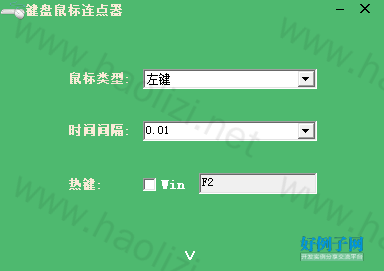
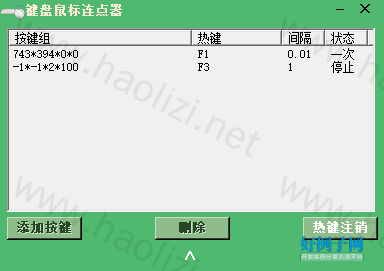
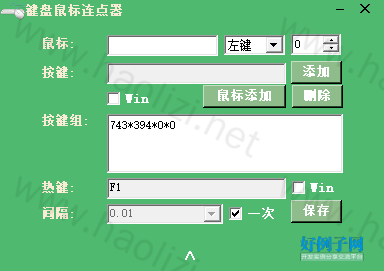
【核心代码】
using System;
using System.Collections.Generic;
using System.ComponentModel;
using System.Data;
using System.Drawing;
using System.Text;
using System.Linq;
using System.Windows.Forms;
using System.Runtime.InteropServices;
using System.Threading;
using System.IO;
namespace MouseKeyClick
{
public partial class Form1 : Form
{
INIHelper ini;
[System.Runtime.InteropServices.DllImport("User32.dll")]
private static extern int SetCursorPos(int x, int y);
[System.Runtime.InteropServices.DllImport("User32.dll")]
private static extern bool ShowWindowAsync(IntPtr hWnd, int cmdShow);
[DllImport("User32.dll")]
public static extern void keybd_event(Byte bVk, Byte bScan, Int32 dwFlags, Int32 dwExtraInfo);
//注册热键的api
[DllImport("user32.dll")]
public static extern bool RegisterHotKey(IntPtr hWnd, int id, uint control, Keys vk);
[DllImport("user32.dll")]
public static extern bool UnregisterHotKey(IntPtr hWnd, int id);
[DllImport("user32.dll", CharSet = CharSet.Auto, CallingConvention = CallingConvention.StdCall)]
private static extern int mouse_event(int dwFlags, int dx, int dy, int cButtons, int dwExtraInfo);
const int MOUSEEVENTF_MOVE = 0x0001; //移动鼠标
const int MOUSEEVENTF_LEFTDOWN = 0x0002; //模拟鼠标左键按下
const int MOUSEEVENTF_LEFTUP = 0x0004; //模拟鼠标左键抬起
const int MOUSEEVENTF_RIGHTDOWN = 0x0008; //模拟鼠标右键按下
const int MOUSEEVENTF_RIGHTUP = 0x0010; //模拟鼠标右键抬起
const int MOUSEEVENTF_MIDDLEDOWN = 0x0020; //模拟鼠标中键按下
const int MOUSEEVENTF_MIDDLEUP = 0x0040; //模拟鼠标中键抬起
const int MOUSEEVENTF_ABSOLUTE = 0x8000; //标示是否采用绝对坐标
Dictionary<int, string> dickeytext = new Dictionary<int, string>();
Dictionary<int, string> dicHotkeytext = new Dictionary<int, string>();
#region 键值
int VK_LBUTTON = 1;// 鼠标的左键
int VK_RBUTTON = 2;// 鼠标的右键
int VK_CANCEL = 3;// Ctrl Break(通常不需要处理)
int VK_MBUTTON = 4;// 鼠标的中键(三按键鼠标)
int VK_BACK = 8;// Backspace键
int VK_TAB = 9;// Tab键
int VK_CLEAR = 12;// Clear键(Num Lock关闭时的数字键盘5)
int VK_RETURN = 13;// Enter键
int VK_SHIFT = 16;// Shift键
int VK_CONTROL = 17;// Ctrl键
int VK_MENU = 18;// Alt键
int VK_PAUSE = 19;// Pause键
int VK_CAPITAL = 20;// Caps Lock键
int VK_ESCAPE = 27;// Ese键
int VK_SPACE = 32;// Spacebar键
int VK_PRIOR = 33;// Page Up键
int VK_NEXT = 34;// Page Domw键
int VK_END = 35;// End键
int VK_HOME = 36;// Home键
int VK_LEFT = 37;// LEFT ARROW 键(←)
int VK_UP = 38;// UP ARROW键(↑)
int VK_RIGHT = 39;// RIGHT ARROW键(→)
int VK_DOWN = 40;// DOWN ARROW键(↓)
int VK_Select = 41;// Select键
int VK_PRINT = 42;//
int VK_EXECUTE = 43;// EXECUTE键
int VK_SNAPSHOT = 44;// Print Screen键(抓屏)
int VK_Insert = 45;// Ins键(Num Lock关闭时的数字键盘0)
int VK_Delete = 46;// Del键(Num Lock关闭时的数字键盘.)
int VK_HELP = 47;// Help键
int VK_0 = 48;// 0键
int VK_1 = 49;// 1键
int VK_2 = 50;// 2键
int VK_3 = 51;// 3键
int VK_4 = 52;// 4键
int VK_5 = 53;// 5键
int VK_6 = 54;// 6键
int VK_7 = 55;// 7键
int VK_8 = 56;// 8键
int VK_9 = 57;// 9键
int VK_A = 65;// A键
int VK_B = 66;// B键
int VK_C = 67;// C键
int VK_D = 68;// D键
int VK_E = 69;// E键
int VK_F = 70;// F键
int VK_G = 71;// G键
int VK_H = 72;// H键
int VK_I = 73;// I键
int VK_J = 74;// J键
int VK_K = 75;// K键
int VK_L = 76;// L键
int VK_M = 77;// M键
int VK_N = 78;// N键
int VK_O = 79;// O键
int VK_P = 80;// P键
int VK_Q = 81;// Q键
int VK_R = 82;// R键
int VK_S = 83;// S键
int VK_T = 84;// T键
int VK_U = 85;// U键
int VK_V = 86;// V键
int VK_W = 87;// W键
int VK_X = 88;// X键
int VK_Y = 89;// Y键
int VK_Z = 90;// Z键
int VK_NUMPAD0 = 96;// 数字键0键
int VK_NUMPAD1 = 97;// 数字键1键
int VK_NUMPAD2 = 98;// 数字键2键
int VK_NUMPAD3 = 99;// 数字键3键
int VK_NUMPAD4 = 100;// 数字键4键
int VK_NUMPAD5 = 101;// 数字键5键
int VK_NUMPAD6 = 102;// 数字键6键
int VK_NUMPAD7 = 103;// 数字键7键
int VK_NUMPAD8 = 104;// 数字键8键
int VK_NUMPAD9 = 105;// 数字键9键
int VK_MULTIPLY = 106;// 数字键盘上的*键
int VK_ADD = 107;// 数字键盘上的 键
int VK_SUBTRACT = 109;// 数字键盘上的-键
int VK_DECIMAL = 110;// 数字键盘上的.键
int VK_DIVIDE = 111;// 数字键盘上的/键
int VK_F1 = 112;// F1键
int VK_F2 = 113;// F2键
int VK_F3 = 114;// F3键
int VK_F4 = 115;// F4键
int VK_F5 = 116;// F5键
int VK_F6 = 117;// F6键
int VK_F7 = 118;// F7键
int VK_F8 = 119;// F8键
int VK_F9 = 120;// F9键
int VK_F10 = 121;// F10键
int VK_F11 = 122;// F11键
int VK_F12 = 123;// F12键
int VK_NUMLOCK = 144;// Num Lock 键
int VK_SCROLL = 145;// Scroll Lock键
int VK_SEPARATOR = 108;// Separator键
#endregion
public Form1()
{
InitializeComponent();
}
private void label1_Click(object sender, EventArgs e)
{
this.Close();
}
private void label2_Click(object sender, EventArgs e)
{
ShowWindowAsync(this.Handle,2);
}
private void label1_MouseMove(object sender, MouseEventArgs e)
{
Cursor.Current = Cursors.Hand;//将光标置为等待状态
label1.ForeColor = Color.BurlyWood;
}
List<String> sss = new List<string>();
private void Form1_Load(object sender, EventArgs e)
{
SW_ = Screen.PrimaryScreen.Bounds.Width - 384;
SH_ = Screen.PrimaryScreen.Bounds.Height - 271;
panel2.Visible = false;
panel2.Location = panel1.Location;
panel3.Visible = false;
panel3.Location = panel1.Location;
this.Width = 384;
this.Height = 271;
string str = System.Environment.CurrentDirectory "\\ini.ini";
if (File.Exists(str))
{
ini = new INIHelper(str);
string location = (ini.GetValue("Location", "Location", ""));
string[] sl = location.Split('*');
try
{
this.Location = new Point(Convert.ToInt32(sl[0]), Convert.ToInt32(sl[1]));
}
catch
{
int SH = Screen.PrimaryScreen.Bounds.Height - 271;
int SW = Screen.PrimaryScreen.Bounds.Width - 384;
this.Location = new Point(SW / 2, SH / 2);
}
}
else
{
File.Create(str);
ini = new INIHelper(str);
}
AddKeyText();
this.mousetype.SelectedIndex = 0;
clicktime.SelectedIndex = 0;
clinttime1.SelectedIndex = 0;
}
protected override CreateParams CreateParams
{
get
{
const int WS_MINIMIZEBOX = 0x00020000; // Winuser.h中定义
CreateParams cp = base.CreateParams;
cp.Style = cp.Style | WS_MINIMIZEBOX; // 允许最小化操作
return cp;
}
}
private void Form1_FormClosing(object sender, FormClosingEventArgs e)
{
//kh.UnHook();
UnregisterHotKey(this.Handle, 225);
ini.SetValue("Mouse", "MouseType", (mousetype.SelectedIndex).ToString());
ini.SetValue("Mouse", "ClickTime", (clicktime.SelectedIndex).ToString());
ini.SetValue("Mouse", "Key", txthotkey.Text);
ini.SetValue("Mouse", "Win", cbwin.Checked.ToString());
for (int i = 0; i < listView1.Items.Count; i )
{
string aaaa = listView1.Items[i].SubItems[3].Text == "一次" ? "0" : "1";
ini.SetValue("Keys", "K" i.ToString() ")", listView1.Items[i].SubItems[0].Text "_" listView1.Items[i].SubItems[1].Text "_" listView1.Items[i].SubItems[2].Text "_" aaaa);
}
for (int j = listView1.Items.Count; j < sss.Count; j )
{
ini.SetValue("Keys", "K" j.ToString() ")","");
}
ini.SetValue("Location", "Location", this.Location.X.ToString() "*" this.Location.Y.ToString());
}
private void _MouseMove(object sender, MouseEventArgs e)
{
Cursor.Current = Cursors.Hand;//将光标置为等待状态
}
private void Form1_Shown(object sender, EventArgs e)
{
cbmousetype1.SelectedIndex = 0;
txthotkey.Text = "F8";
string str = System.Environment.CurrentDirectory "\\ini.ini";
if (File.Exists(str))
{
try
{
mousetype.SelectedIndex = Convert.ToInt32(ini.GetValue("Mouse", "MouseType", ""));
clicktime.SelectedIndex = Convert.ToInt32(ini.GetValue("Mouse", "ClickTime", ""));
txthotkey.Text = ini.GetValue("Mouse", "Key", "");
cbwin.Checked = Convert.ToBoolean(ini.GetValue("Mouse", "Win", ""));
sss = ini.GetSection("Keys", str);
}
catch
{ }
bool sflag = false;
for (int i = 0; i < sss.Count; i )
{
string items = sss[i].Replace("K" i.ToString() ")=", "");
string[] item = items.Split('_');
if (item.Length == 4)
{
item[3] = item[3] == "0" ? "一次" : "停止";
AddListView(item[0], item[1], item[2], item[3]);
sflag = true;
listView1.Items[listView1.Items.Count - 1].Selected = false;
}
}
if (sflag)
{
btnhotkey1_Click(null,null);
}
}
else
{
File.Create(str);
ini = new INIHelper(str);
}
//UnregisterHotKey(this.Handle, 225);
//RegisterHotKey(this.Handle, 225, 0, (Keys)112 7);
//txthotkey.Text = "F8";
btnhotkeyre_Click(null, null);
/*
Alt = 1,
Ctrl = 2,
Shift = 4,
WindowsKey = 8 */
label3.Focus();
UnregisterHotKey(this.Handle, 224);
RegisterHotKey(this.Handle, 224, 1, Keys.Z);
UnregisterHotKey(this.Handle, 222);
RegisterHotKey(this.Handle, 222, 1, Keys.X);
UnregisterHotKey(this.Handle, 223);
RegisterHotKey(this.Handle, 223, 1, Keys.C);
UnregisterHotKey(this.Handle, 200);
RegisterHotKey(this.Handle, 200, 1, Keys.V);
UnregisterHotKey(this.Handle, 201);
RegisterHotKey(this.Handle, 201, 1, Keys.B);
}
private void Click_()
{
timer1.Interval = (int)(float.Parse(clicktime.Text) * 1000);
panel1.Enabled = !panel1.Enabled;
timer1.Enabled = !timer1.Enabled;
}
protected override void WndProc(ref Message m)
{
switch (m.Msg)
{
case 0x0312: //这个是window消息定义的注册的热键消息
if (m.WParam.ToString().Equals("222")) //提高音量热键
{
btnhotkey1_Click(null,null);
}
else if (m.WParam.ToString().Equals("223")) //提高音量热键
{
this.Close();
}
else if (m.WParam.ToString().Equals("224")) //提高音量热键
{
this.Visible = !this.Visible;
}
else if (m.WParam.ToString().Equals("225")) //提高音量热键
{
timer1.Interval = (int)(float.Parse(clicktime.Text) * 1000);
panel1.Enabled = !panel1.Enabled;
timer1.Enabled = !timer1.Enabled;
}
else if (m.WParam.ToString().Equals("200")) //提高音量热键
{
btnlocation_Click(null, null);
}
else if (m.WParam.ToString().Equals("201")) //提高音量热键
{
btnmouseadd_Click(null, null);
}
for (int x = 0; x < listView1.Items.Count; x )
{
if (m.WParam.ToString().Equals((226 x).ToString())) //提高音量热键
{
if (listView1.Items[x].SubItems[3].Text == "停止")
{
listView1.Items[x].SubItems[3].Text = "运行";
Thread thread = new Thread(new ParameterizedThreadStart(SendKeyss));
thread.IsBackground = true;
//string o = "hello";
//thread.Start((object)o);
dic[listView1.Items[x].SubItems[1].Text] = thread;
dic1[listView1.Items[x].SubItems[1].Text] = true;
dic[listView1.Items[x].SubItems[1].Text].Start((object)listView1.Items[x]);
}
else if (listView1.Items[x].SubItems[3].Text == "运行")
{
//try
//{
// dic[listView1.Items[x].SubItems[1].Text].Abort();
//}
//catch { }
dic1[listView1.Items[x].SubItems[1].Text] = false;
listView1.Items[x].SubItems[3].Text = "停止";
}
else
{
Thread thread = new Thread(new ParameterizedThreadStart(SendKeyss));
thread.IsBackground = true;
//string o = "hello";
//thread.Start((object)o);
dic[listView1.Items[x].SubItems[1].Text] = thread;
dic1[listView1.Items[x].SubItems[1].Text] = true;
dic[listView1.Items[x].SubItems[1].Text].Start((object)listView1.Items[x]);
}
}
}
break;
}
base.WndProc(ref m);
}
int asd = 0;
private void SendKeyss(object o)
{
ListViewItem lvs = (ListViewItem)o;
if (lvs.SubItems[3].Text == "一次")
{
string keysss1 = lvs.SubItems[0].Text;
string[] keysss2 = keysss1.Split('|');
for (int j = 0; j < keysss2.Length; j )
{
string[] keysss4 = keysss2[j].Split('*');
if (keysss4.Length > 1)
{
SetCursorPos(Convert.ToInt32(keysss4[0]) < 0 ? Cursor.Position.X : Convert.ToInt32(keysss4[0]), Convert.ToInt32(keysss4[1]) < 0 ? Cursor.Position.Y : Convert.ToInt32(keysss4[1]));
int mflag = Convert.ToInt32(keysss4[2]);
if (mflag == 0)
{
mouse_event(MOUSEEVENTF_LEFTDOWN | MOUSEEVENTF_LEFTUP, Convert.ToInt32(keysss4[0]) < 0 ? Cursor.Position.X : Convert.ToInt32(keysss4[0]), Convert.ToInt32(keysss4[1]) < 0 ? Cursor.Position.Y : Convert.ToInt32(keysss4[1]), 0, 0);
}
if (mflag == 1)
{
mouse_event(MOUSEEVENTF_LEFTDOWN | MOUSEEVENTF_LEFTUP | MOUSEEVENTF_LEFTDOWN | MOUSEEVENTF_LEFTUP, Convert.ToInt32(keysss4[0]) < 0 ? Cursor.Position.X : Convert.ToInt32(keysss4[0]), Convert.ToInt32(keysss4[1]) < 0 ? Cursor.Position.Y : Convert.ToInt32(keysss4[1]), 0, 0);
}
if (mflag == 2)
{
mouse_event(MOUSEEVENTF_RIGHTDOWN | MOUSEEVENTF_RIGHTUP, Convert.ToInt32(keysss4[0]) < 0 ? Cursor.Position.X : Convert.ToInt32(keysss4[0]), Convert.ToInt32(keysss4[1]) < 0 ? Cursor.Position.Y : Convert.ToInt32(keysss4[1]), 0, 0);
}
dic[lvs.SubItems[1].Text].Join(Convert.ToInt32(keysss4[3]));
continue;
}
string[] keysss3 = keysss2[j].Split(' ');
for (int i = 0; i < keysss3.Length; i )
{
int keyL = dickeytext.FirstOrDefault(q => q.Value == keysss3[i]).Key; //get first key
keybd_event((byte)keyL, 0, 0, 0); //0x5b是left win的代码,这一句使key按下,下一句使key释放。
}
for (int i = 0; i < keysss3.Length; i )
{
int keyL = dickeytext.FirstOrDefault(q => q.Value == keysss3[i]).Key; //get first key
keybd_event((byte)keyL, 0, 0x2, 0);
}
}
int timmmm = (int)(float.Parse(lvs.SubItems[2].Text) * 1000);
}
else
{
while (dic1[lvs.SubItems[1].Text])
{
string keysss1 = lvs.SubItems[0].Text;
string[] keysss2 = keysss1.Split('|');
for (int j = 0; j < keysss2.Length; j )
{
string[] keysss4 = keysss2[j].Split('*');
if (keysss4.Length > 1)
{
SetCursorPos(Convert.ToInt32(keysss4[0]) < 0 ? Cursor.Position.X : Convert.ToInt32(keysss4[0]), Convert.ToInt32(keysss4[1]) < 0 ? Cursor.Position.Y : Convert.ToInt32(keysss4[1]));
int mflag = Convert.ToInt32(keysss4[2]);
if (mflag == 0)
{
mouse_event(MOUSEEVENTF_LEFTDOWN | MOUSEEVENTF_LEFTUP, Convert.ToInt32(keysss4[0]) < 0 ? Cursor.Position.X : Convert.ToInt32(keysss4[0]), Convert.ToInt32(keysss4[1]) < 0 ? Cursor.Position.Y : Convert.ToInt32(keysss4[1]), 0, 0);
}
if (mflag == 1)
{
mouse_event(MOUSEEVENTF_LEFTDOWN | MOUSEEVENTF_LEFTUP | MOUSEEVENTF_LEFTDOWN | MOUSEEVENTF_LEFTUP, Convert.ToInt32(keysss4[0]) < 0 ? Cursor.Position.X : Convert.ToInt32(keysss4[0]), Convert.ToInt32(keysss4[1]) < 0 ? Cursor.Position.Y : Convert.ToInt32(keysss4[1]), 0, 0);
}
if (mflag == 2)
{
mouse_event(MOUSEEVENTF_RIGHTDOWN | MOUSEEVENTF_RIGHTUP, Convert.ToInt32(keysss4[0]) < 0 ? Cursor.Position.X : Convert.ToInt32(keysss4[0]), Convert.ToInt32(keysss4[1]) < 0 ? Cursor.Position.Y : Convert.ToInt32(keysss4[1]), 0, 0);
}
dic[lvs.SubItems[1].Text].Join(Convert.ToInt32(keysss4[3]));
continue;
}
string[] keysss3 = keysss2[j].Split(' ');
for (int i = 0; i < keysss3.Length; i )
{
int keyL = dickeytext.FirstOrDefault(q => q.Value == keysss3[i]).Key; //get first key
keybd_event((byte)keyL, 0, 0, 0); //0x5b是left win的代码,这一句使key按下,下一句使key释放。
}
for (int i = 0; i < keysss3.Length; i )
{
int keyL = dickeytext.FirstOrDefault(q => q.Value == keysss3[i]).Key; //get first key
keybd_event((byte)keyL, 0, 0x2, 0);
}
}
int timmmm = (int)(float.Parse(lvs.SubItems[2].Text) * 1000);
dic[lvs.SubItems[1].Text].Join(timmmm);
}
}
}
private void clickhotkey_SelectedIndexChanged(object sender, EventArgs e)
{
UnregisterHotKey(this.Handle, 225);
RegisterHotKey(this.Handle, 225, 0, (Keys)112 7);
}
private void timer1_Tick(object sender, EventArgs e)
{
int mflag = mousetype.SelectedIndex;
if (mflag == 0)
{
mouse_event(MOUSEEVENTF_LEFTDOWN | MOUSEEVENTF_LEFTUP, Cursor.Position.X, Cursor.Position.Y, 0, 0);
}
if (mflag == 1)
{
mouse_event(MOUSEEVENTF_LEFTDOWN | MOUSEEVENTF_LEFTUP | MOUSEEVENTF_LEFTDOWN | MOUSEEVENTF_LEFTUP, Cursor.Position.X, Cursor.Position.Y, 0, 0);
}
if (mflag == 2)
{
mouse_event(MOUSEEVENTF_RIGHTDOWN | MOUSEEVENTF_RIGHTUP, Cursor.Position.X, Cursor.Position.Y, 0, 0);
}
}
private Point offset;
private void Form1_MouseDown(object sender, MouseEventArgs e)
{
if (MouseButtons.Left != e.Button) return;
Point cur = this.PointToScreen(e.Location);
offset = new Point(cur.X - this.Left, cur.Y - this.Top);
}
private void Form1_MouseMove(object sender, MouseEventArgs e)
{
if (MouseButtons.Left != e.Button) return;
Point cur = MousePosition;
this.Location = new Point(cur.X - offset.X, cur.Y - offset.Y);
}
private void label7_MouseMove(object sender, MouseEventArgs e)
{
Cursor.Current = Cursors.Hand;//将光标置为等待状态
label7.ForeColor = Color.BurlyWood;
}
private void label7_MouseLeave(object sender, EventArgs e)
{
label7.ForeColor = Color.White;
}
private void label7_Click(object sender, EventArgs e)
{
if (label7.Text == "∨")
{
if (panel1.Visible)
{
setenable(2, true);
label7.Text = "∧";
}
else
{
setenable(3, true);
label7.Text = "∧";
}
}
else
{
if (panel3.Visible)
{
setenable(2, true);
}
else
{
setenable(1, true);
label7.Text = "∨";
}
}
}
private void setenable(int index, bool flag)
{
if (index == 1)
{
panel1.Visible = flag;
panel2.Visible = !flag;
panel3.Visible = !flag;
}
else if (index == 2)
{
panel1.Visible = !flag;
panel2.Visible = flag;
panel3.Visible = !flag;
}
else if (index == 3)
{
panel1.Visible = !flag;
panel2.Visible = !flag;
panel3.Visible = flag;
}
}
private void AddKeyText()
{
/*
None = 0,
Alt = 1,
Ctrl = 2,
Shift = 4,
WindowsKey = 8 c 131072 a 262144 s 65536 */
//dickeytext[131072] = "Control";
//dickeytext[262144] = "Alt";
//dickeytext[65536] = "Shift";
dickeytext[1] = "鼠标的左";//
dickeytext[2] = "鼠标的右";//
dickeytext[3] = "Ctrl Break";//(通常不需要处理)
dickeytext[4] = "鼠标的中";//(三按";//鼠标)
dickeytext[8] = "Backspace";//
dickeytext[9] = "Tab";//
dickeytext[12] = "Clear";//(Num Lock关闭时的Num盘5)
dickeytext[13] = "Enter";//
dickeytext[16] = "Shift";//SHIFT CONTROL ALT
dicHotkeytext[4] = "Shift";//SHIFT CONTROL ALT
dickeytext[17] = "Control";//
dicHotkeytext[2] = "Control";//
dickeytext[18] = "Alt";//
dicHotkeytext[1] = "Alt";//
dickeytext[19] = "Pause";//
dickeytext[20] = "Caps Lock";//
dickeytext[27] = "Ese";//
dickeytext[32] = "Spacebar";//
dickeytext[33] = "Page Up";//
dickeytext[34] = "Page Domw";//
dickeytext[35] = "End";//
dickeytext[36] = "Home";//
dickeytext[37] = "LEFT ";//(←)
dickeytext[38] = "UP";//(↑)
dickeytext[39] = "RIGHT";//(→)
dickeytext[40] = "DOWN";//(↓)
dickeytext[41] = "Select";//
dickeytext[43] = "EXECUTE";//
dickeytext[44] = "Print Screen";//(抓屏)
dickeytext[45] = "Ins";//(Num Lock关闭时的Num盘0)
dickeytext[46] = "Del";//(Num Lock关闭时的Num盘.)
dickeytext[47] = "Help";//
dickeytext[48] = "0";//
dickeytext[49] = "1";//
dickeytext[50] = "2";//
dickeytext[51] = "3";//
dickeytext[52] = "4";//
dickeytext[53] = "5";//
dickeytext[54] = "6";//
dickeytext[55] = "7";//
dickeytext[56] = "8";//
dickeytext[57] = "9";//
dickeytext[65] = "A";//
dickeytext[66] = "B";//
dickeytext[67] = "C";//
dickeytext[68] = "D";//
dickeytext[69] = "E";//
dickeytext[70] = "F";//
dickeytext[71] = "G";//
dickeytext[72] = "H";//
dickeytext[73] = "I";//
dickeytext[74] = "J";//
dickeytext[75] = "K";//
dickeytext[76] = "L";//
dickeytext[77] = "M";//
dickeytext[78] = "N";//
dickeytext[79] = "O";//
dickeytext[80] = "P";//
dickeytext[81] = "Q";//
dickeytext[82] = "R";//
dickeytext[83] = "S";//
dickeytext[84] = "T";//
dickeytext[85] = "U";//
dickeytext[86] = "V";//
dickeytext[87] = "W";//
dickeytext[88] = "X";//
dickeytext[89] = "Y";//
dickeytext[90] = "Z";//
dickeytext[96] = "Num0";//
dickeytext[97] = "Num1";//
dickeytext[98] = "Num2";//
dickeytext[99] = "Num3";//
dickeytext[100] = "Num4";//
dickeytext[101] = "Num5";//
dickeytext[102] = "Num6";//
dickeytext[103] = "Num7";//
dickeytext[104] = "Num8";//
dickeytext[105] = "Num9";//
dickeytext[106] = "Num*";//
dickeytext[107] = "Num ";//
dickeytext[109] = "Num-";//
dickeytext[110] = "Num.";//
dickeytext[111] = "Num/";//
dickeytext[112] = "F1";//
dickeytext[113] = "F2";//
dickeytext[114] = "F3";//
dickeytext[115] = "F4";//
dickeytext[116] = "F5";//
dickeytext[117] = "F6";//
dickeytext[118] = "F7";//
dickeytext[119] = "F8";//
dickeytext[120] = "F9";//
dickeytext[121] = "F10";//
dickeytext[122] = "F11";//
dickeytext[123] = "F12";//
dickeytext[144] = "Num Lock ";//
dickeytext[145] = "Scroll Lock";//
dickeytext[108] = "Separator";//
dickeytext[91] = "左win";
dicHotkeytext[8] = "Win";//SHIFT CONTROL ALT
dickeytext[92] = "右win";
dickeytext[93] = "右Ctr";
dickeytext[186] = ";";
dickeytext[187] = "=";
dickeytext[188] = ",";
dickeytext[189] = "-";
dickeytext[190] = ".";
dickeytext[191] = "/";
dickeytext[192] = "~";
dickeytext[219] = "[";
dickeytext[220] = "\\";
dickeytext[221] = "]";
dickeytext[222] = "\"";
dickeytext[231] = "左\\";
dickeytext[229] = "";
}
private void txthotkey_KeyDown(object sender, KeyEventArgs e)
{
//e.SuppressKeyPress = false;
txthotkey.Text = "";
int a = (int)e.KeyCode;
string kk = e.Modifiers.ToString().Replace(", ", " ");
if (kk != "None")
{
if (a == 16 || a == 17 || a == 18 || a == 91 || a == 92)
{
txthotkey.Text = (kk == "None" ? "" : kk.Replace("|", " ") " ");
}
else
{
txthotkey.Text = (kk == "None" ? "" : kk.Replace("|", " ") " ") dickeytext[a];
}
}
else
{
txthotkey.Text = (kk == "None" ? "" : kk.Replace("|", " ") " ") dickeytext[a];
}
}
private void txthotkey_TextChanged(object sender, EventArgs e)
{
string texx = txthotkey.Text;
if (texx.Length > 0)
{
if (texx.Substring(texx.Length - 1, 1) == " ")
{
txthotkey.Text = "";
}
else
{
btnhotkeyre_Click(null,null);
label3.Focus();
}
}
}
private void btnhotkeyre_Click(object sender, EventArgs e)
{
if (btnhotkeyre.Text == "热键注册")
{
int keyz = 0;
string[] strvalues = txthotkey.Text.Split(' ');
for (int i = 0; i < strvalues.Length - 1; i )
{
int firstKey = dicHotkeytext.FirstOrDefault(q => q.Value == strvalues[i]).Key; //get first key
keyz = firstKey;
}
int keyL = dickeytext.FirstOrDefault(q => q.Value == strvalues[strvalues.Length - 1]).Key; //get first key
UnregisterHotKey(this.Handle, 225);
RegisterHotKey(this.Handle, 225, (uint)(keyz (cbwin.Checked ? 8 : 0)), (Keys)keyL);
//btnhotkeyre.Text = "注销热键";
}
else
{
timer1.Enabled = false;
UnregisterHotKey(this.Handle, 225);
btnhotkeyre.Text = "热键注册";
}
}
private void btnadd_Click(object sender, EventArgs e)
{
saveflag = "Add";
win1.Checked = false;
win2.Checked = false;
rtbkeys.Text = "";
txthotkey1.Text = "";
clinttime1.SelectedIndex = 0;
cbyc.Checked = false;
txtkey.Text = "";
setenable(3, true);
}
private void AddListView(string str1, string str2, string str3,string str4)
{
ListViewItem aListItem = new ListViewItem();
aListItem.SubItems.Add("");
aListItem.SubItems.Add("");
aListItem.SubItems.Add("");
aListItem.SubItems.Add("");
listView1.Items.Add(aListItem);
aListItem.SubItems[0].Text = str1;
aListItem.SubItems[1].Text = str2;
aListItem.SubItems[2].Text = str3;
aListItem.SubItems[3].Text = str4;
}
private void SetListView(ListViewItem aListItem, string str1, string str2, string str3, string str4)
{
aListItem.SubItems[0].Text = str1;
aListItem.SubItems[1].Text = str2;
aListItem.SubItems[2].Text = str3;
aListItem.SubItems[3].Text = str4;
}
string saveflag = "";
ListViewItem aaListItem;
private void listView1_MouseDoubleClick(object sender, MouseEventArgs e)
{
win1.Checked = false;
txtkey.Text = "";
aaListItem = listView1.SelectedItems[0];
saveflag = "Edit";
rtbkeys.Text = aaListItem.SubItems[0].Text;
if (aaListItem.SubItems[1].Text.Contains("Win "))
{
win2.Checked = true;
}
else
{
win2.Checked = false;
}
txthotkey1.Text =aaListItem.SubItems[1].Text.Replace("Win ","");
clinttime1.Text = aaListItem.SubItems[2].Text;
if (aaListItem.SubItems[3].Text == "一次")
{
cbyc.Checked = true;
}
else
{
cbyc.Checked = !true;
}
setenable(3, true);
}
private void txtkey_KeyDown(object sender, KeyEventArgs e)
{
txtkey.Text = "";
int a = (int)e.KeyCode;
string kk = e.Modifiers.ToString().Replace(", ", " ");
if (kk != "None")
{
if (a == 16 || a == 17 || a == 18 || a == 91 || a == 92)
{
txtkey.Text = (kk == "None" ? "" : kk.Replace("|", " ") " ");
}
else
{
txtkey.Text = (kk == "None" ? "" : kk.Replace("|", " ") " ") dickeytext[a];
}
}
else
{
txtkey.Text = (kk == "None" ? "" : kk.Replace("|", " ") " ") dickeytext[a];
}
}
private void btnkeyadd_Click(object sender, EventArgs e)
{
if (txtkey.Text != "")
{
if (win1.Checked)
{
if (rtbkeys.Text == "")
{
rtbkeys.Text = "Win " txtkey.Text;
}
else
{
rtbkeys.Text = "|" "Win " txtkey.Text;
}
}
else
{
if (rtbkeys.Text == "")
{
rtbkeys.Text = txtkey.Text;
}
else
{
rtbkeys.Text = "|" txtkey.Text;
}
}
}
}
private void txtkey_TextChanged(object sender, EventArgs e)
{
string texx = txtkey.Text;
if (texx.Length > 0)
{
if (texx.Substring(texx.Length - 1, 1) == " ")
{
txtkey.Text = "";
}
}
}
private void btnkeydel_Click(object sender, EventArgs e)
{
string str = rtbkeys.Text;
rtbkeys.Text = "";
string[] keys = str.Split('|');
for (int i = 0; i < keys.Length - 1; i )
{
if (i == keys.Length - 2)
{
rtbkeys.Text = keys[i];
}
else
{
rtbkeys.Text = keys[i] "|";
}
}
}
private void txthotkey1_KeyDown(object sender, KeyEventArgs e)
{
txthotkey1.Text = "";
int a = (int)e.KeyCode;
string kk = e.Modifiers.ToString().Replace(", ", " ");
if (kk != "None")
{
if (a == 16 || a == 17 || a == 18 || a == 91 || a == 92)
{
txthotkey1.Text = (kk == "None" ? "" : kk.Replace("|", " ") " ");
}
else
{
txthotkey1.Text = (kk == "None" ? "" : kk.Replace("|", " ") " ") dickeytext[a];
}
}
else
{
txthotkey1.Text = (kk == "None" ? "" : kk.Replace("|", " ") " ") dickeytext[a];
}
}
private void txthotkey1_TextChanged(object sender, EventArgs e)
{
string texx = txthotkey1.Text;
if (texx.Length > 0)
{
if (texx.Substring(texx.Length - 1, 1) == " ")
{
txthotkey1.Text = "";
}
}
}
KeyboardHook kh;
void kh_OnKeyDownEvent(object sender, KeyEventArgs e)
{
int keyz = 0;
string[] strvalues = txthotkey.Text.Split(' ');
for (int i = 0; i < strvalues.Length ; i )
{
int firstKey = dickeytext.FirstOrDefault(q => q.Value == strvalues[i]).Key; //get first key
keyz = firstKey;
}
if ((int)e.KeyData ==keyz) { Click_(); }//c 131072 a 262144 s 65536 Ctrl S显示窗口
}
private void cbwin_CheckedChanged(object sender, EventArgs e)
{
btnhotkeyre_Click(null,null);
}
Dictionary<string, Thread> dic = new Dictionary<string, Thread>();
Dictionary<string, bool> dic1 = new Dictionary<string, bool>();
private void btnsave_Click(object sender, EventArgs e)
{
if (rtbkeys.Text == "")
{
MessageBox.Show("按键组不能为空.");
return;
}
if (txthotkey1.Text == "")
{
MessageBox.Show("热键不能为空.");
return;
}
string keysss = win2.Checked ? ("Win " txthotkey1.Text) : txthotkey1.Text;
string keysss1 = cbwin.Checked ? ("Win " txthotkey.Text) : txthotkey.Text;
if (saveflag == "Add")
{
foreach (ListViewItem lv in listView1.Items)
{
if (lv.SubItems[1].Text == keysss || lv.SubItems[1].Text == keysss1)
{
MessageBox.Show("热键冲突.");
return;
}
}
if (cbyc.Checked)
{
AddListView(rtbkeys.Text, keysss, clinttime1.Text, "一次");
}
else
{
AddListView(rtbkeys.Text, keysss, clinttime1.Text, "停止");
}
}
else
{
foreach (ListViewItem lv in listView1.Items)
{
if (lv.SubItems[1].Text == keysss || lv.SubItems[1].Text == keysss1)
{
if (lv!=aaListItem)
{
MessageBox.Show("热键冲突.");
return;
}
}
}
if (cbyc.Checked)
{
SetListView(listView1.SelectedItems[0], rtbkeys.Text, keysss, clinttime1.Text, "一次");
}
else
{
SetListView(listView1.SelectedItems[0], rtbkeys.Text, keysss, clinttime1.Text, "停止");
}
listView1.SelectedItems[0].Selected = false;
}
label7_Click(null, null);
}
private void btnhotkey1_Click(object sender, EventArgs e)
{
if (btnhotkey1.Text == "热键注册")
{
for (int x = 0; x < listView1.Items.Count; x )
{
if(dic1.ContainsKey(listView1.Items[x].SubItems[1].Text))
{
dic1[listView1.Items[x].SubItems[1].Text] = false;
//try
//{
// dic[listView1.Items[x].SubItems[1].Text].Abort();
//}
//catch
//{ }
}
int keyz = 0;
string[] strvalues = listView1.Items[x].SubItems[1].Text.Split(' ');
for (int i = 0; i < strvalues.Length - 1; i )
{
int firstKey = dicHotkeytext.FirstOrDefault(q => q.Value == strvalues[i]).Key; //get first key
keyz = firstKey;
}
int keyL = dickeytext.FirstOrDefault(q => q.Value == strvalues[strvalues.Length - 1]).Key; //get first key
UnregisterHotKey(this.Handle, 226 x);
RegisterHotKey(this.Handle, 226 x, (uint)keyz, (Keys)keyL);
Thread thread = new Thread(new ParameterizedThreadStart(SendKeyss));
thread.IsBackground = true;
//string o = "hello";
//thread.Start((object)o);
dic[listView1.Items[listView1.Items.Count - 1].SubItems[1].Text] = thread;
dic1[listView1.Items[listView1.Items.Count - 1].SubItems[1].Text] = false;
}
listView1.Enabled = !listView1.Enabled;
btnadd.Enabled = !btnadd.Enabled;
btndelete.Enabled = !btndelete.Enabled;
btnhotkey1.Text = "热键注销";
}
else
{
for (int x = 0; x < listView1.Items.Count; x )
{
dic1[listView1.Items[x].SubItems[1].Text] = false;
string sss = listView1.Items[x].SubItems[3].Text;
listView1.Items[x].SubItems[3].Text = sss == "一次" ? sss : "停止";
UnregisterHotKey(this.Handle, 226 x);
}
listView1.Enabled = !listView1.Enabled;
btndelete.Enabled = !btndelete.Enabled;
btnadd.Enabled = !btnadd.Enabled;
btnhotkey1.Text = "热键注册";
}
}
private void cbyc_CheckedChanged(object sender, EventArgs e)
{
clinttime1.Enabled = !cbyc.Checked;
}
private void btndelete_Click(object sender, EventArgs e)
{
if (listView1.SelectedItems.Count > 0)
{
dic.Remove(listView1.Items[listView1.Items.Count - 1].SubItems[1].Text);
dic1.Remove(listView1.Items[listView1.Items.Count - 1].SubItems[1].Text);
listView1.Items.Remove(listView1.SelectedItems[0]);
}
}
private void label1_MouseLeave(object sender, EventArgs e)
{
label1.ForeColor = Color.Black;
}
private void label2_MouseLeave(object sender, EventArgs e)
{
label2.ForeColor = Color.Black;
}
private void label2_MouseMove(object sender, MouseEventArgs e)
{
Cursor.Current = Cursors.Hand;//将光标置为等待状态
label2.ForeColor = Color.BurlyWood;
}
private void btnlocation_Click(object sender, EventArgs e)
{
Point screenPoint = Control.MousePosition;
txtLocation.Text = screenPoint.X.ToString() "*" screenPoint.Y.ToString();
}
private void btnlocation_MouseEnter(object sender, EventArgs e)
{
ToolTip p = new ToolTip();
p.ShowAlways = true;
}
private void btnhotkey1_MouseEnter(object sender, EventArgs e)
{
ToolTip p = new ToolTip();
p.ShowAlways = true;
p.SetToolTip(this.btnhotkey1, "Alt X");
}
private void btnmouseadd_Click(object sender, EventArgs e)
{
if (txtLocation.Text == "")
{
txtLocation.Text = "-1*-1";
}
if (rtbkeys.Text == "")
{
rtbkeys.Text = txtLocation.Text "*" cbmousetype1.SelectedIndex.ToString() "*" numericUpDown1.Value.ToString();
}
else
{
rtbkeys.Text = "|" txtLocation.Text "*" cbmousetype1.SelectedIndex.ToString() "*" numericUpDown1.Value.ToString();
}
}
private void btnmouseadd_MouseEnter(object sender, EventArgs e)
{
ToolTip p = new ToolTip();
p.ShowAlways = true;
p.SetToolTip(this.btnmouseadd, "Alt B");
}
private void Form1_LocationChanged(object sender, EventArgs e)
{
LocationChange();
}
int SW_ = 0;
int SH_ = 0;
private void LocationChange()
{
int xx = this.Location.X, yy = this.Location.Y;
if (yy > SH_)
{
yy = SH_;
}
if (yy < 0)
{
yy = 0;
}
if (xx < 0)
{
xx = 0;
}
if (xx > SW_)
{
xx = SW_;
}
this.Location = new Point(xx, yy);
}
}
}
好例子网口号:伸出你的我的手 — 分享!
相关软件
小贴士
感谢您为本站写下的评论,您的评论对其它用户来说具有重要的参考价值,所以请认真填写。
- 类似“顶”、“沙发”之类没有营养的文字,对勤劳贡献的楼主来说是令人沮丧的反馈信息。
- 相信您也不想看到一排文字/表情墙,所以请不要反馈意义不大的重复字符,也请尽量不要纯表情的回复。
- 提问之前请再仔细看一遍楼主的说明,或许是您遗漏了。
- 请勿到处挖坑绊人、招贴广告。既占空间让人厌烦,又没人会搭理,于人于己都无利。
关于好例子网
本站旨在为广大IT学习爱好者提供一个非营利性互相学习交流分享平台。本站所有资源都可以被免费获取学习研究。本站资源来自网友分享,对搜索内容的合法性不具有预见性、识别性、控制性,仅供学习研究,请务必在下载后24小时内给予删除,不得用于其他任何用途,否则后果自负。基于互联网的特殊性,平台无法对用户传输的作品、信息、内容的权属或合法性、安全性、合规性、真实性、科学性、完整权、有效性等进行实质审查;无论平台是否已进行审查,用户均应自行承担因其传输的作品、信息、内容而可能或已经产生的侵权或权属纠纷等法律责任。本站所有资源不代表本站的观点或立场,基于网友分享,根据中国法律《信息网络传播权保护条例》第二十二与二十三条之规定,若资源存在侵权或相关问题请联系本站客服人员,点此联系我们。关于更多版权及免责申明参见 版权及免责申明

网友评论
我要评论