


实例介绍
【实例简介】需要安装DirectX Runtime Jun 2010
【实例截图】
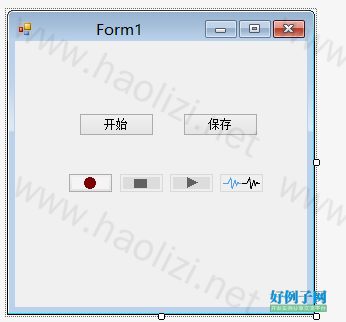
【核心代码】
using System;
using System.Collections.Generic;
using System.ComponentModel;
using System.Data;
using System.Drawing;
using System.IO;
using System.Linq;
using System.Text;
using System.Threading;
using System.Windows.Forms;
using Microsoft.DirectX.DirectSound;

namespace test2
{
    public partial class Form1 : Form
    {
        public Form1()
        {
            mWavFormat = SetWaveFormat();

            //
            // Windows 窗体设计器支持所必需的
            //
            InitializeComponent();

            //
            // TODO: 在 InitializeComponent 调用后添加任何构造函数代码
            //
        }


        private WaveFormat SetWaveFormat()
        {
            WaveFormat format = new WaveFormat();
            format.FormatTag = WaveFormatTag.Pcm;//设置音频类型
            format.SamplesPerSecond = 22050;//采样率(单位:赫兹)典型值:11025、22050、44100Hz
            format.BitsPerSample = 16;//采样位数
            format.Channels = 1;//声道
            format.BlockAlign = (short)(format.Channels * (format.BitsPerSample / 8));//单位采样点的字节数
            format.AverageBytesPerSecond = format.BlockAlign * format.SamplesPerSecond;
            return format;
            //按照以上采样规格,可知采样1秒钟的字节数为22050*2=55100B 约为 53K
        }
        //创建WAVE文件
        private void CreateWaveFile(string strFileName)
        {
            fsWav = new FileStream(strFileName, FileMode.Create);
            mWriter = new BinaryWriter(fsWav);
            /**************************************************************************
               Here is where the file will be created. A
               wave file is a RIFF file, which has chunks
               of data that describe what the file contains.
               A wave RIFF file is put together like this:
               The 12 byte RIFF chunk is constructed like this:
               Bytes 0 - 3 :  'R' 'I' 'F' 'F'
               Bytes 4 - 7 :  Length of file, minus the first 8 bytes of the RIFF description.
                                 (4 bytes for "WAVE"   24 bytes for format chunk length
                                 8 bytes for data chunk description   actual sample data size.)
                Bytes 8 - 11: 'W' 'A' 'V' 'E'
                The 24 byte FORMAT chunk is constructed like this:
                Bytes 0 - 3 : 'f' 'm' 't' ' '
                Bytes 4 - 7 : The format chunk length. This is always 16.
                Bytes 8 - 9 : File padding. Always 1.
                Bytes 10- 11: Number of channels. Either 1 for mono,  or 2 for stereo.
                Bytes 12- 15: Sample rate.
                Bytes 16- 19: Number of bytes per second.
                Bytes 20- 21: Bytes per sample. 1 for 8 bit mono, 2 for 8 bit stereo or
                                16 bit mono, 4 for 16 bit stereo.
                Bytes 22- 23: Number of bits per sample.
                The DATA chunk is constructed like this:
                Bytes 0 - 3 : 'd' 'a' 't' 'a'
                Bytes 4 - 7 : Length of data, in bytes.
                Bytes 8 -: Actual sample data.
              ***************************************************************************/
            char[] ChunkRiff = { 'R', 'I', 'F', 'F' };
            char[] ChunkType = { 'W', 'A', 'V', 'E' };
            char[] ChunkFmt = { 'f', 'm', 't', ' ' };
            char[] ChunkData = { 'd', 'a', 't', 'a' };
            short shPad = 1;                // File padding
            int nFormatChunkLength = 0x10;  // Format chunk length.
            int nLength = 0;                // File length, minus first 8 bytes of RIFF description. This will be filled in later.
            short shBytesPerSample = 0;     // Bytes per sample.
            // 一个样本点的字节数目
            if (8 == mWavFormat.BitsPerSample && 1 == mWavFormat.Channels)
                shBytesPerSample = 1;
            else if ((8 == mWavFormat.BitsPerSample && 2 == mWavFormat.Channels) || (16 == mWavFormat.BitsPerSample && 1 == mWavFormat.Channels))
                shBytesPerSample = 2;
            else if (16 == mWavFormat.BitsPerSample && 2 == mWavFormat.Channels)
                shBytesPerSample = 4;
            // RIFF 块
            mWriter.Write(ChunkRiff);
            mWriter.Write(nLength);
            mWriter.Write(ChunkType);
            // WAVE块
            mWriter.Write(ChunkFmt);
            mWriter.Write(nFormatChunkLength);
            mWriter.Write(shPad);
            mWriter.Write(mWavFormat.Channels);
            mWriter.Write(mWavFormat.SamplesPerSecond);
            mWriter.Write(mWavFormat.AverageBytesPerSecond);
            mWriter.Write(shBytesPerSample);
            mWriter.Write(mWavFormat.BitsPerSample);
            // 数据块
            mWriter.Write(ChunkData);
            mWriter.Write((int)0);   // The sample length will be written in later.

        }

        private bool CreateCaputerDevice()
        {
            //首先要玫举可用的捕捉设备
            CaptureDevicesCollection capturedev = new CaptureDevicesCollection();
            Guid devguid;
            if (capturedev.Count > 0)
            {
                devguid = capturedev[capturedev.Count - 1].DriverGuid;
            }
            else
            {
                MessageBox.Show("当前没有可用于音频捕捉的设备", "系统提示");
                return false;
            }
            //利用设备GUID来建立一个捕捉设备对象
            capture = new Capture(devguid);
            return true;
        }

        private void CreateCaptureBuffer()
        {//想要创建一个捕捉缓冲区必须要两个参数:缓冲区信息(描述这个缓冲区中的格式等),缓冲设备。

            CaptureBufferDescription bufferdescription = new CaptureBufferDescription();
            bufferdescription.Format = mWavFormat;//设置缓冲区要捕捉的数据格式
            iNotifySize = mWavFormat.AverageBytesPerSecond / iNotifyNum;//设置通知大小
            iBufferSize = iNotifyNum * iNotifySize;
            bufferdescription.BufferBytes = iBufferSize;
            capturebuffer = new CaptureBuffer(bufferdescription, capture);//建立设备缓冲区对象
        }
        //设置通知
        private void CreateNotification()
        {
            BufferPositionNotify[] bpn = new BufferPositionNotify[iNotifyNum];//设置缓冲区通知个数
            //设置通知事件
            notifyevent = new AutoResetEvent(false);
            notifythread = new Thread(new ThreadStart(RecoData));
            notifythread.Start();
            for (int i = 0; i < iNotifyNum; i  )
            {
                bpn[i].Offset = iNotifySize   i * iNotifySize - 1;//设置具体每个的位置
                bpn[i].EventNotifyHandle = notifyevent.Handle;
            }
            myNotify = new Notify(capturebuffer);
            myNotify.SetNotificationPositions(bpn);

        }
        //线程中的事件
        private void RecoData()
        {
            while (true)
            {
                // 等待缓冲区的通知消息
                notifyevent.WaitOne(Timeout.Infinite, true);
                // 录制数据
                RecordCapturedData();
            }
        }

        //真正转移数据的事件,其实就是把数据转移到WAV文件中。
        private void RecordCapturedData()
        {
            byte[] capturedata = null;
            int readpos = 0, capturepos = 0, locksize = 0;
            capturebuffer.GetCurrentPosition(out capturepos, out readpos);
            locksize = readpos - iBufferOffset;//这个大小就是我们可以安全读取的大小
            if (locksize == 0)
            {
                return;
            }
            if (locksize < 0)
            {//因为我们是循环的使用缓冲区,所以有一种情况下为负:当文以载读指针回到第一个通知点,而Ibuffeoffset还在最后一个通知处
                locksize  = iBufferSize;
            }

            capturedata = (byte[])capturebuffer.Read(iBufferOffset, typeof(byte), LockFlag.FromWriteCursor, locksize);
            mWriter.Write(capturedata, 0, capturedata.Length);//写入到文件
            iSampleSize  = capturedata.Length;
            iBufferOffset  = capturedata.Length;
            iBufferOffset %= iBufferSize;//取模是因为缓冲区是循环的。
        }


        private void button1_Click_1(object sender, System.EventArgs e)
        {

            Thread.Sleep(100);
            capturebuffer.Stop();


            capturebuffer = null;
            fsWav.Close();

            MessageBox.Show("保存成功");

        }
        private void button2_Click(object sender, System.EventArgs e)
        {

            CreateWaveFile("d:/test.wav");
            if (!CreateCaputerDevice())
                return;

            CreateCaptureBuffer();//创建缓冲


            CreateNotification();//设置通知
            capturebuffer.Start(true);


        }

    }
}
好例子网口号:伸出你的我的手 — 分享!
网友评论
小贴士
感谢您为本站写下的评论,您的评论对其它用户来说具有重要的参考价值,所以请认真填写。
- 类似“顶”、“沙发”之类没有营养的文字,对勤劳贡献的楼主来说是令人沮丧的反馈信息。
- 相信您也不想看到一排文字/表情墙,所以请不要反馈意义不大的重复字符,也请尽量不要纯表情的回复。
- 提问之前请再仔细看一遍楼主的说明,或许是您遗漏了。
- 请勿到处挖坑绊人、招贴广告。既占空间让人厌烦,又没人会搭理,于人于己都无利。
关于好例子网
本站旨在为广大IT学习爱好者提供一个非营利性互相学习交流分享平台。本站所有资源都可以被免费获取学习研究。本站资源来自网友分享,对搜索内容的合法性不具有预见性、识别性、控制性,仅供学习研究,请务必在下载后24小时内给予删除,不得用于其他任何用途,否则后果自负。基于互联网的特殊性,平台无法对用户传输的作品、信息、内容的权属或合法性、安全性、合规性、真实性、科学性、完整权、有效性等进行实质审查;无论平台是否已进行审查,用户均应自行承担因其传输的作品、信息、内容而可能或已经产生的侵权或权属纠纷等法律责任。本站所有资源不代表本站的观点或立场,基于网友分享,根据中国法律《信息网络传播权保护条例》第二十二与二十三条之规定,若资源存在侵权或相关问题请联系本站客服人员,点此联系我们。关于更多版权及免责申明参见 版权及免责申明

支持(0) 盖楼(回复)
支持(0) 盖楼(回复)