


实例介绍
【实例简介】
【实例截图】
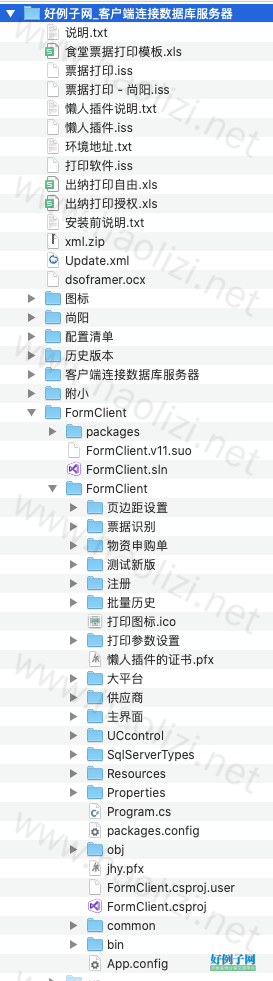
【核心代码】
using FormClient.Properties;
using G6凭证工具_测试版_.文件夹;
using NPOI.SS.Formula.Functions;
using System;
using System.Collections.Generic;
using System.Data;
using System.Data.SqlClient;
using System.Drawing;
using System.Drawing.Printing;
using System.IO;
using System.Reflection;
using System.Windows.Forms;
using static FormClient.common.pulic;
using static TabControlEX.打印测试;
namespace FormClient.主界面
{
public partial class 转账新 : Form
{
public 转账新()
{
InitializeComponent();
if (主窗体.btName == "转账支票请领单")
{
comboBox1.SelectedIndex = comboBox1.Items.IndexOf("转账支票请领单");
}
if (主窗体.btName == "食堂支票")
{
comboBox1.SelectedIndex = comboBox1.Items.IndexOf("食堂支票");
}
if (主窗体.btName == "食堂进账单")
{
comboBox1.SelectedIndex = comboBox1.Items.IndexOf("食堂进账单");
}
//MessageBox.Show(主窗体.btName);
}
/// <summary>
/// 跨窗体传递非excel版本收到收款、付款参数
/// </summary>
/// <param name="textBox">指定文本框</param>
/// <param name="str">厂家、开户行、账号</param>
public void Updatetext(TextBox textBox, string str)
{
textBox.Text = str;
}
public string 年; public string 月; public string 日;
private void Home_Load(object sender, EventArgs e)
{
MyList.fontname = Settings.Default.fontname;
MyList.fontsize = Settings.Default.fontsize;
MyList.brush = Settings.Default.brush;
#region 控件位置
//打印PToolStripButton.Alignment = ToolStripItemAlignment.Right;
//toolStripStatusLabel3.Alignment = ToolStripItemAlignment.Right;
//打印模板设置LToolStripButton.Alignment = ToolStripItemAlignment.Right;
//打印预览PToolStripButton.Alignment = ToolStripItemAlignment.Right;
#endregion
#region 添加收款选择
TextBox TB = T1;
Button B = new Button
{
Name = "收款方",
//Text = "...",
Font = new Font("黑体", 5, FontStyle.Bold),
ForeColor = Color.Blue,
Parent = TB,
Width = 30,
FlatStyle = FlatStyle.Flat,
//B.Height = 20;
Dock = DockStyle.Right,
BackColor = Color.FromArgb(255, 255, 255)
};
B.Image = Properties.Resources.search_16px;
B.FlatAppearance.BorderSize = 0;
B.BringToFront();
B.Cursor = Cursors.Hand;
B.Click = B_Click;
#endregion
#region 添加付款选择
TextBox T = T4;
Button bt = new Button
{
Name = "付款方",
//Text = "...",
Font = new Font("黑体", 5, FontStyle.Bold),
ForeColor = Color.Blue,
Parent = T,
Width = 30,
FlatStyle = FlatStyle.Flat,
//B.Height = 20;
Dock = DockStyle.Right,
BackColor = Color.FromArgb(255, 255, 255)
};
bt.Image = Properties.Resources.search_16px;
bt.FlatAppearance.BorderSize = 0;
bt.BringToFront();
bt.Cursor = Cursors.Hand;
bt.Click = Bt_Click;
#endregion
}
/// <summary>
/// 付款方
/// </summary>
/// <param name="sender"></param>
/// <param name="e"></param>
private void Bt_Click(object sender, EventArgs e)
{
try
{
收款方查询 s = new 收款方查询(this);
Button btn = (Button)sender;
s.Updateform(s, btn.Name);
//s.Update模式(s.toolStripStatusLabel3, "非Excel");
转账新 z = new 转账新();
//s.Owner =z;this
s.ShowDialog();
}
catch (Exception ex)
{
MessageBox.Show(ex.ToString(), "提示", MessageBoxButtons.OK, MessageBoxIcon.Question);
}
}
/// <summary>
/// 收款方
/// </summary>
/// <param name="sender"></param>
/// <param name="e"></param>
private void B_Click(object sender, EventArgs e)
{
try
{
收款方查询 s = new 收款方查询(this);
Button btn = (Button)sender;
s.Updateform(s, btn.Name);
//s.Update模式(s.toolStripStatusLabel3, "非Excel");
转账新 z = new 转账新();
//s.Owner =z;
s.ShowDialog();
Settings.Default.批量打印日期 = dateTimePicker1.Value.ToString("yyyy-MM-dd");
Settings.Default.Save();
}
catch (Exception ex)
{
MessageBox.Show(ex.ToString(), "提示", MessageBoxButtons.OK, MessageBoxIcon.Question);
}
}
/// <summary>
/// 傻瓜式拆分大小写为独立
/// </summary>
public void 大小写()
{
try
{
double dbdata = Convert.ToDouble(T7.Text);
string str1 = String.Format("{0:F}", dbdata);//默认为保留两位
T7.Text = str1;
string sss = NumberToChinese(T7.Text); //返回五
string 分; string 角; string 元; string 十; string 百;
string 千; string 万; string 拾; string 佰; string 仟;
//textBox5.Text = sss;
string str = sss.Replace(".", "");
//textBox4.Text = pp;
//string str = textBox4.Text;
int len = str.Length;
if (len - 1 < 0) { 分 = "零"; }
else
{ string s1 = str.Substring(len - 1, 1); 分 = s1; }
if (len - 2 < 0) { 角 = "零"; }
else
{ string s2 = str.Substring(len - 2, 1); 角 = s2; }
if (len - 3 < 0) { 元 = "零"; }
else
{ string s3 = str.Substring(len - 3, 1); 元 = s3; }
if (len - 4 < 0) { 十 = "零"; }
else
{ string s4 = str.Substring(len - 4, 1); 十 = s4; }
if (len - 5 < 0) { 百 = "零"; }
else
{ string s5 = str.Substring(len - 5, 1); 百 = s5; }
if (len - 6 < 0) { 千 = "零"; }
else
{ string s6 = str.Substring(len - 6, 1); 千 = s6; }
if (len - 7 < 0) { 万 = "零"; }
else
{ string s7 = str.Substring(len - 7, 1); 万 = s7; }
if (len - 8 < 0) { 拾 = "零"; }
else
{ string s8 = str.Substring(len - 8, 1); 拾 = s8; }
if (len - 9 < 0) { 佰 = "零"; }
else
{ string s9 = str.Substring(len - 9, 1); 佰 = s9; }
if (len - 10 < 0) { 仟 = "零"; }
else
{ string s10 = str.Substring(len - 10, 1); 仟 = s10; }
MyList.num.Clear();//清空数组
MyList.num.Add(仟); MyList.num.Add(佰); MyList.num.Add(拾); MyList.num.Add(万); MyList.num.Add(千);
MyList.num.Add(百); MyList.num.Add(十); MyList.num.Add(元); MyList.num.Add(角); MyList.num.Add(分);
//for (int j = 0; j < 10; j )
//{
// MessageBox.Show(MyList.num[j]);
//}
string num = T7.Text.Replace(".", "");
int NUlen = num.Length;
string 分_x; string 角_x; string 元_x; string 十_x; string 百_x;
string 千_x; string 万_x; string 拾_x; string 佰_x; string 仟_x;
if (NUlen - 10 < 0) { 仟_x = "¥"; }
else
{
string s10 = num.Substring(NUlen - 10, 1); 仟_x = s10;
}
if (NUlen - 9 < 0) { 佰_x = "¥"; 仟_x = ""; }
else
{
string s9 = num.Substring(NUlen - 9, 1); 佰_x = s9;
}
if (NUlen - 8 < 0) { 拾_x = "¥"; 佰_x = ""; 仟_x = ""; }
else
{
string s8 = num.Substring(NUlen - 8, 1); 拾_x = s8;
}
if (NUlen - 7 < 0) { 万_x = "¥"; 拾_x = ""; 佰_x = ""; 仟_x = ""; }
else
{
string s7 = num.Substring(NUlen - 7, 1); 万_x = s7;
}
if (NUlen - 6 < 0) { 千_x = "¥"; 万_x = ""; 拾_x = ""; 佰_x = ""; 仟_x = ""; }
else
{
string s6 = num.Substring(NUlen - 6, 1); 千_x = s6;
}
if (NUlen - 5 < 0) { 百_x = "¥"; 千_x = ""; 万_x = ""; 拾_x = ""; 佰_x = ""; 仟_x = ""; }
else
{
string s5 = num.Substring(NUlen - 5, 1); 百_x = s5;
}
if (NUlen - 4 < 0) { 十_x = "¥"; 百_x = ""; 千_x = ""; 万_x = ""; 拾_x = ""; 佰_x = ""; 仟_x = ""; }
else
{
string s4 = num.Substring(NUlen - 4, 1); 十_x = s4;
}
if (NUlen - 3 < 0) { 元_x = "¥"; 十_x = ""; 百_x = ""; 千_x = ""; 万_x = ""; 拾_x = ""; 佰_x = ""; 仟_x = ""; }
else
{
string s3 = num.Substring(NUlen - 3, 1); 元_x = s3;
}
if (NUlen - 2 < 0) { 角_x = "¥"; 元_x = ""; 十_x = ""; 百_x = ""; 千_x = ""; 万_x = ""; 拾_x = ""; 佰_x = ""; 仟_x = ""; }
else
{
string s2 = num.Substring(NUlen - 2, 1); 角_x = s2;
}
if (NUlen - 1 < 0) { 分_x = "¥"; 角_x = ""; 元_x = ""; 十_x = ""; 百_x = ""; 千_x = ""; 万_x = ""; 拾_x = ""; 佰_x = ""; 仟_x = ""; }
else
{
string s1 = num.Substring(NUlen - 1, 1); 分_x = s1;
}
MyList.num_x.Clear();//清空数组,不然会继续使用上次的数组内容
MyList.num_x.Add(仟_x); MyList.num_x.Add(佰_x); MyList.num_x.Add(拾_x); MyList.num_x.Add(万_x); MyList.num_x.Add(千_x);
MyList.num_x.Add(百_x); MyList.num_x.Add(十_x); MyList.num_x.Add(元_x); MyList.num_x.Add(角_x); MyList.num_x.Add(分_x);
}
catch (Exception ex)
{
MessageBox.Show(ex.ToString(), "打印提示", MessageBoxButtons.OKCancel, MessageBoxIcon.Question);
}
}
/// <summary>
/// 从读取后List转到
/// </summary>
public void 读取页边距()
{
try
{
string txtFile; string txtFile_nim;
if (comboBox1.Text == null || comboBox1.Text == "")
{
MessageBox.Show("请先切换打印模式...", "提示", MessageBoxButtons.OK, MessageBoxIcon.Exclamation);
return;
}
switch (comboBox1.SelectedIndex)
{
case 0:
txtFile = Directory.GetCurrentDirectory() "\\配置清单\\配置文件_转账单.txt";
MyList.FileList.Clear();
MyList.FileList = ReadTextFileToList(txtFile);
string txtFile_nxm = Directory.GetCurrentDirectory() "\\配置清单\\配置文件大写_转账单.txt";
MyList.location.Clear();
MyList.location = ReadTextFileToList(txtFile_nxm);
txtFile_nim = Directory.GetCurrentDirectory() "\\配置清单\\配置文件小写_转账单.txt";
MyList.location_x.Clear();
MyList.location_x = ReadTextFileToList(txtFile_nim);
break;
case 1:
//读取收付款位置
txtFile = Directory.GetCurrentDirectory() "\\配置清单\\配置文件收付款_批量支票.txt";
MyList.FileList.Clear();
MyList.FileList = ReadTextFileToList(txtFile);
//读取小写位置
txtFile_nim = Directory.GetCurrentDirectory() "\\配置清单\\配置文件小写_批量支票.txt";
MyList.location_x.Clear();
MyList.location_x = ReadTextFileToList(txtFile_nim);
break;
case 2:
//读取收付款位置
txtFile = Directory.GetCurrentDirectory() "\\配置清单\\配置文件收付款_批量进账单.txt";
MyList.FileList.Clear();
MyList.FileList = ReadTextFileToList(txtFile);
//读取小写位置
txtFile_nim = Directory.GetCurrentDirectory() "\\配置清单\\配置文件小写_批量进账单.txt";
MyList.location_x.Clear();
MyList.location_x = ReadTextFileToList(txtFile_nim);
break;
}
}
catch
{
MessageBox.Show("未获取到打印参数!", "提示", MessageBoxButtons.OK, MessageBoxIcon.Error);
return;
}
}
/// <summary>
/// 文件流读取txt转List
/// </summary>
/// <param name="fileName"></param>
/// <returns></returns>
public List<string> ReadTextFileToList(string fileName)
{
FileStream fs = new FileStream(fileName, FileMode.Open, FileAccess.Read);
List<string> list = new List<string>();
StreamReader sr = new StreamReader(fs);
//使用StreamReader类来读取文件
sr.BaseStream.Seek(0, SeekOrigin.Begin);
// 从数据流中读取每一行,直到文件的最后一行
string tmp = sr.ReadLine();
while (tmp != null)
{
list.Add(tmp);
tmp = sr.ReadLine();
}
//关闭此StreamReader对象
sr.Close();
fs.Close();
return list;
}
private void 打印PToolStripButton_Click(object sender, EventArgs e)
{
打印();
}
private void T7_TextChanged(object sender, EventArgs e)
{
textBox4.Text = 转账旧.CmycurD(T7.Text);
}
private void Swap(ref int i, ref int j)
{
int tmp = i;
i = j;
j = tmp;
}
private int MM2Inch(int mm)
{
return (int)(mm * 100.0f / 25.4f);
}
private void PrintDocument1_PrintPage(object sender, System.Drawing.Printing.PrintPageEventArgs e)
{
float leftMargin = e.MarginBounds.Left;
float topMargin = e.MarginBounds.Top;
Graphics g = e.Graphics;
g.PageScale = 1;
g.PageUnit = GraphicsUnit.Millimeter;//单位
Font fntTxt = new Font(Settings.Default.fontname, Settings.Default.fontsize, FontStyle.Regular);//正文文字
Brush brush = new SolidBrush(Settings.Default.brush);//画刷
try
{
TextBox[] T = new TextBox[6] { T1, T2, T3, T4, T5, T6 };//, T7, T8, T9, T10, T11, T12
string 收款大写 = CmycurD(decimal.Parse(T7.Text.ToString()));
#region 转账支票
if (comboBox1.Text == "转账支票请领单")
{
//收付款
//收款方全称换行
if (T[0].Text.ToString().Trim().Length < 20)//小于22个字符正常打印
{
e.Graphics.DrawString(T[0].Text.ToString(), fntTxt, brush, new PointF((float)decimal.Parse(MyList.FileList[0].ToString().Trim(new char[] { '(', ')' }).Split(',')[0]), (float)decimal.Parse(MyList.FileList[0].ToString().Trim(new char[] { '(', ')' }).Split(',')[1])));
}
else
{
RectangleF descRect = new RectangleF
{
Location = new PointF((float)decimal.Parse(MyList.FileList[0].ToString().Trim(new char[] { '(', ')' }).Split(',')[0]), (float)decimal.Parse(MyList.FileList[0].ToString().Trim(new char[] { '(', ')' }).Split(',')[1])),
Size = new Size(Settings.Default.换行长度, ((int)e.Graphics.MeasureString(T[0].Text.ToString(), fntTxt, 25, StringFormat.GenericTypographic).Height))
};
e.Graphics.DrawString(T[0].Text.ToString(), fntTxt, brush, descRect);
}
//付款方全称换行
if (T[3].Text.ToString().Trim().Length < 9)//小于22个字符正常打印
{
e.Graphics.DrawString(T[3].Text.ToString(), fntTxt, brush, new PointF((float)decimal.Parse(MyList.FileList[3].ToString().Trim(new char[] { '(', ')' }).Split(',')[0]), (float)decimal.Parse(MyList.FileList[3].ToString().Trim(new char[] { '(', ')' }).Split(',')[1])));
}
else
{
RectangleF descRect = new RectangleF
{
Location = new PointF((float)decimal.Parse(MyList.FileList[3].ToString().Trim(new char[] { '(', ')' }).Split(',')[0]), (float)decimal.Parse(MyList.FileList[3].ToString().Trim(new char[] { '(', ')' }).Split(',')[1])),
Size = new Size(Settings.Default.换行长度, ((int)e.Graphics.MeasureString(T[3].Text.ToString(), fntTxt, 25, StringFormat.GenericTypographic).Height))
};
e.Graphics.DrawString(T[3].Text.ToString(), fntTxt, brush, descRect);
}
//收款账号、开户行
for (int i = 1; i < 3; i )
{
e.Graphics.DrawString(T[i].Text.ToString(), fntTxt, brush, new PointF((float)decimal.Parse(MyList.FileList[i].ToString().Trim(new char[] { '(', ')' }).Split(',')[0]), (float)decimal.Parse(MyList.FileList[i].ToString().Trim(new char[] { '(', ')' }).Split(',')[1])));
}
//付款账号、开户行
for (int i = 4; i < 6; i )
{
e.Graphics.DrawString(T[i].Text.ToString(), fntTxt, brush, new PointF((float)decimal.Parse(MyList.FileList[i].ToString().Trim(new char[] { '(', ')' }).Split(',')[0]), (float)decimal.Parse(MyList.FileList[i].ToString().Trim(new char[] { '(', ')' }).Split(',')[1])));
}
//大写分位
for (int i = 0; i < 10; i )
{
e.Graphics.DrawString(MyList.num[i].ToString(), fntTxt, brush, new PointF((float)decimal.Parse(MyList.location[i].ToString().Trim(new char[] { '(', ')' }).Split(',')[0]), (float)decimal.Parse(MyList.location[i].ToString().Trim(new char[] { '(', ')' }).Split(',')[1])));
}
//小写
for (int i = 0; i < 10; i )
{
e.Graphics.DrawString(MyList.num_x[i].ToString(), fntTxt, brush, new PointF((float)decimal.Parse(MyList.location_x[i].ToString().Trim(new char[] { '(', ')' }).Split(',')[0]), (float)decimal.Parse(MyList.location_x[i].ToString().Trim(new char[] { '(', ')' }).Split(',')[1])));
}
//年月日和备注
MyList.year = dateTimePicker1.Value.Year.ToString();
MyList.month = dateTimePicker1.Value.Month.ToString("00");
MyList.day = dateTimePicker1.Value.Day.ToString("00");
MyList.beizhu = T9.Text.ToString();
e.Graphics.DrawString(MyList.year, fntTxt, brush, new PointF((float)decimal.Parse(MyList.FileList[6].ToString().Trim(new char[] { '(', ')' }).Split(',')[0]), (float)decimal.Parse(MyList.FileList[6].ToString().Trim(new char[] { '(', ')' }).Split(',')[1])));
e.Graphics.DrawString(MyList.month, fntTxt, brush, new PointF((float)decimal.Parse(MyList.FileList[7].ToString().Trim(new char[] { '(', ')' }).Split(',')[0]), (float)decimal.Parse(MyList.FileList[7].ToString().Trim(new char[] { '(', ')' }).Split(',')[1])));
e.Graphics.DrawString(MyList.day, fntTxt, brush, new PointF((float)decimal.Parse(MyList.FileList[8].ToString().Trim(new char[] { '(', ')' }).Split(',')[0]), (float)decimal.Parse(MyList.FileList[8].ToString().Trim(new char[] { '(', ')' }).Split(',')[1])));
//设置备注的宽度使其自动换行
//MessageBox.Show(MyList.beizhu, T9.Text.ToString()); MessageBox.Show(MyList.FileList[9].ToString(), MyList.day);
//e.Graphics.DrawString(MyList.beizhu, fntTxt, brush, new PointF((float)decimal.Parse(MyList.FileList[9].ToString().Trim(new char[] { '(', ')' }).Split(',')[0]), (float)decimal.Parse(MyList.FileList[9].ToString().Trim(new char[] { '(', ')' }).Split(',')[1])));
//设置备注换行
if (MyList.beizhu.Trim().Length < 5)//小于6个字符正常打印
{
e.Graphics.DrawString(MyList.beizhu, fntTxt, brush, new PointF((float)decimal.Parse(MyList.FileList[9].ToString().Trim(new char[] { '(', ')' }).Split(',')[0]), (float)decimal.Parse(MyList.FileList[9].ToString().Trim(new char[] { '(', ')' }).Split(',')[1])));
}
else
{
//
StringFormat fmt = new StringFormat
{
LineAlignment = StringAlignment.Near,//左对齐
FormatFlags = StringFormatFlags.LineLimit//自动换行
};
RectangleF descRect = new RectangleF
{
Location = new PointF((float)decimal.Parse(MyList.FileList[9].ToString().Trim(new char[] { '(', ')' }).Split(',')[0]), (float)decimal.Parse(MyList.FileList[9].ToString().Trim(new char[] { '(', ')' }).Split(',')[1])),
Size = new Size(25, ((int)e.Graphics.MeasureString(MyList.beizhu, fntTxt, 25, StringFormat.GenericTypographic).Height))
};
e.Graphics.DrawString(MyList.beizhu, fntTxt, brush, descRect);
}
}
#endregion
#region 食堂进账单
else if (comboBox1.Text == "食堂进账单")
{
common.pulic.进账单.付款方 = T4.Text.ToString();
common.pulic.进账单.付款方账号 = T5.Text.ToString();
common.pulic.进账单.付款方开户行 = T6.Text.ToString();
common.pulic.进账单.收款方 = T1.Text.ToString();
common.pulic.进账单.收款方账号 = T2.Text.ToString();
common.pulic.进账单.收款方开户行 = T3.Text.ToString();
//收付款
//for (int i = 0; i < 6; i )
//{
// e.Graphics.DrawString(T[i].Text.ToString(), fntTxt, brush, new PointF((float)decimal.Parse(MyList.FileList[i].ToString().Trim(new char[] { '(', ')' }).Split(',')[0]), (float)decimal.Parse(MyList.FileList[i].ToString().Trim(new char[] { '(', ')' }).Split(',')[1])));
//}
//收付款
//收款方全称换行
if (T[0].Text.ToString().Trim().Length < 19)//小于6个字符正常打印
{
e.Graphics.DrawString(T[0].Text.ToString(), fntTxt, brush, new PointF((float)decimal.Parse(MyList.FileList[0].ToString().Trim(new char[] { '(', ')' }).Split(',')[0]), (float)decimal.Parse(MyList.FileList[0].ToString().Trim(new char[] { '(', ')' }).Split(',')[1])));
}
else
{
RectangleF descRect = new RectangleF
{
Location = new PointF((float)decimal.Parse(MyList.FileList[0].ToString().Trim(new char[] { '(', ')' }).Split(',')[0]), (float)decimal.Parse(MyList.FileList[0].ToString().Trim(new char[] { '(', ')' }).Split(',')[1])),
Size = new Size(Settings.Default.进账单换行长度, ((int)e.Graphics.MeasureString(T[0].Text.ToString(), fntTxt, 25, StringFormat.GenericTypographic).Height))
};
e.Graphics.DrawString(T[0].Text.ToString(), fntTxt, brush, descRect);
}
//付款方全称换行
if (T[3].Text.ToString().Trim().Length < 19)//小于6个字符正常打印
{
e.Graphics.DrawString(T[3].Text.ToString(), fntTxt, brush, new PointF((float)decimal.Parse(MyList.FileList[3].ToString().Trim(new char[] { '(', ')' }).Split(',')[0]), (float)decimal.Parse(MyList.FileList[3].ToString().Trim(new char[] { '(', ')' }).Split(',')[1])));
}
else
{
RectangleF descRect = new RectangleF
{
Location = new PointF((float)decimal.Parse(MyList.FileList[3].ToString().Trim(new char[] { '(', ')' }).Split(',')[0]), (float)decimal.Parse(MyList.FileList[3].ToString().Trim(new char[] { '(', ')' }).Split(',')[1])),
Size = new Size(Settings.Default.进账单换行长度, ((int)e.Graphics.MeasureString(T[3].Text.ToString(), fntTxt, 25, StringFormat.GenericTypographic).Height))
};
e.Graphics.DrawString(T[3].Text.ToString(), fntTxt, brush, descRect);
}
//收款账号、开户行
for (int i = 1; i < 3; i )
{
e.Graphics.DrawString(T[i].Text.ToString(), fntTxt, brush, new PointF((float)decimal.Parse(MyList.FileList[i].ToString().Trim(new char[] { '(', ')' }).Split(',')[0]), (float)decimal.Parse(MyList.FileList[i].ToString().Trim(new char[] { '(', ')' }).Split(',')[1])));
}
//付款账号、开户行
for (int i = 4; i < 6; i )
{
e.Graphics.DrawString(T[i].Text.ToString(), fntTxt, brush, new PointF((float)decimal.Parse(MyList.FileList[i].ToString().Trim(new char[] { '(', ')' }).Split(',')[0]), (float)decimal.Parse(MyList.FileList[i].ToString().Trim(new char[] { '(', ')' }).Split(',')[1])));
}
//大写不分位
e.Graphics.DrawString(收款大写, fntTxt, brush, new PointF((float)decimal.Parse(MyList.FileList[10].ToString().Trim(new char[] { '(', ')' }).Split(',')[0]), (float)decimal.Parse(MyList.FileList[10].ToString().Trim(new char[] { '(', ')' }).Split(',')[1])));
//小写
for (int i = 0; i < 10; i )
{
e.Graphics.DrawString(MyList.num_x[i].ToString(), fntTxt, brush, new PointF((float)decimal.Parse(MyList.location_x[i].ToString().Trim(new char[] { '(', ')' }).Split(',')[0]), (float)decimal.Parse(MyList.location_x[i].ToString().Trim(new char[] { '(', ')' }).Split(',')[1])));
}
//年月日和备注(进账单不打备注)
MyList.year = dateTimePicker1.Value.Year.ToString();
MyList.month = dateTimePicker1.Value.Month.ToString("00");
MyList.day = dateTimePicker1.Value.Day.ToString("00");
//MyList.beizhu = T9.Text.ToString();
//MessageBox.Show(MyList.beizhu, T9.Text.ToString()); MessageBox.Show(MyList.FileList[9].ToString(), MyList.day);
e.Graphics.DrawString(MyList.year, fntTxt, brush, new PointF((float)decimal.Parse(MyList.FileList[6].ToString().Trim(new char[] { '(', ')' }).Split(',')[0]), (float)decimal.Parse(MyList.FileList[6].ToString().Trim(new char[] { '(', ')' }).Split(',')[1])));
e.Graphics.DrawString(MyList.month, fntTxt, brush, new PointF((float)decimal.Parse(MyList.FileList[7].ToString().Trim(new char[] { '(', ')' }).Split(',')[0]), (float)decimal.Parse(MyList.FileList[7].ToString().Trim(new char[] { '(', ')' }).Split(',')[1])));
e.Graphics.DrawString(MyList.day, fntTxt, brush, new PointF((float)decimal.Parse(MyList.FileList[8].ToString().Trim(new char[] { '(', ')' }).Split(',')[0]), (float)decimal.Parse(MyList.FileList[8].ToString().Trim(new char[] { '(', ')' }).Split(',')[1])));
//e.Graphics.DrawString(MyList.beizhu, fntTxt, brush, new PointF((float)decimal.Parse(MyList.FileList[9].ToString().Trim(new char[] { '(', ')' }).Split(',')[0]), (float)decimal.Parse(MyList.FileList[9].ToString().Trim(new char[] { '(', ')' }).Split(',')[1])));
}
#endregion
#region 食堂支票
else if (comboBox1.Text == "食堂支票")
{
//收付款
string 收款方 = T1.Text;
decimal 金额 = decimal.Parse(T7.Text);
string 备注 = T9.Text;
e.Graphics.DrawString(收款方, fntTxt, brush, new PointF((float)decimal.Parse(MyList.FileList[3].ToString().Trim(new char[] { '(', ')' }).Split(',')[0]), (float)decimal.Parse(MyList.FileList[3].ToString().Trim(new char[] { '(', ')' }).Split(',')[1])));
e.Graphics.DrawString(收款大写, fntTxt, brush, new PointF((float)decimal.Parse(MyList.FileList[4].ToString().Trim(new char[] { '(', ')' }).Split(',')[0]), (float)decimal.Parse(MyList.FileList[4].ToString().Trim(new char[] { '(', ')' }).Split(',')[1])));
e.Graphics.DrawString(备注, fntTxt, brush, new PointF((float)decimal.Parse(MyList.FileList[5].ToString().Trim(new char[] { '(', ')' }).Split(',')[0]), (float)decimal.Parse(MyList.FileList[5].ToString().Trim(new char[] { '(', ')' }).Split(',')[1])));
//小写
for (int i = 0; i < 10; i )
{
e.Graphics.DrawString(MyList.num_x[i].ToString(), fntTxt, brush, new PointF((float)decimal.Parse(MyList.location_x[i].ToString().Trim(new char[] { '(', ')' }).Split(',')[0]), (float)decimal.Parse(MyList.location_x[i].ToString().Trim(new char[] { '(', ')' }).Split(',')[1])));
}
//年月日和备注
日期(dateTimePicker1.Value.ToString("yyyyMMdd"));
e.Graphics.DrawString(年, fntTxt, brush, new PointF((float)decimal.Parse(MyList.FileList[0].ToString().Trim(new char[] { '(', ')' }).Split(',')[0]), (float)decimal.Parse(MyList.FileList[0].ToString().Trim(new char[] { '(', ')' }).Split(',')[1])));
e.Graphics.DrawString(月, fntTxt, brush, new PointF((float)decimal.Parse(MyList.FileList[1].ToString().Trim(new char[] { '(', ')' }).Split(',')[0]), (float)decimal.Parse(MyList.FileList[1].ToString().Trim(new char[] { '(', ')' }).Split(',')[1])));
e.Graphics.DrawString(日, fntTxt, brush, new PointF((float)decimal.Parse(MyList.FileList[2].ToString().Trim(new char[] { '(', ')' }).Split(',')[0]), (float)decimal.Parse(MyList.FileList[2].ToString().Trim(new char[] { '(', ')' }).Split(',')[1])));
MyList.year = dateTimePicker1.Value.Year.ToString();
MyList.month = dateTimePicker1.Value.Month.ToString("00");
MyList.day = dateTimePicker1.Value.Day.ToString("00");
e.Graphics.DrawString(MyList.year, fntTxt, brush, new PointF((float)decimal.Parse(MyList.FileList[6].ToString().Trim(new char[] { '(', ')' }).Split(',')[0]), (float)decimal.Parse(MyList.FileList[6].ToString().Trim(new char[] { '(', ')' }).Split(',')[1])));
e.Graphics.DrawString(MyList.month, fntTxt, brush, new PointF((float)decimal.Parse(MyList.FileList[7].ToString().Trim(new char[] { '(', ')' }).Split(',')[0]), (float)decimal.Parse(MyList.FileList[7].ToString().Trim(new char[] { '(', ')' }).Split(',')[1])));
e.Graphics.DrawString(MyList.day, fntTxt, brush, new PointF((float)decimal.Parse(MyList.FileList[8].ToString().Trim(new char[] { '(', ')' }).Split(',')[0]), (float)decimal.Parse(MyList.FileList[8].ToString().Trim(new char[] { '(', ')' }).Split(',')[1])));
//控制支票头收款厂家换行,范围为30
RectangleF descRect = new RectangleF
{
Location = new PointF((float)decimal.Parse(MyList.FileList[9].ToString().Trim(new char[] { '(', ')' }).Split(',')[0]), (float)decimal.Parse(MyList.FileList[9].ToString().Trim(new char[] { '(', ')' }).Split(',')[1])),
Size = new Size(25, ((int)e.Graphics.MeasureString(收款方, fntTxt, 25, StringFormat.GenericTypographic).Height))
};
e.Graphics.DrawString(收款方, fntTxt, brush, descRect);
e.Graphics.DrawString(金额.ToString("C"), fntTxt, brush, new PointF((float)decimal.Parse(MyList.FileList[10].ToString().Trim(new char[] { '(', ')' }).Split(',')[0]), (float)decimal.Parse(MyList.FileList[10].ToString().Trim(new char[] { '(', ')' }).Split(',')[1])));
e.Graphics.DrawString(备注, fntTxt, brush, new PointF((float)decimal.Parse(MyList.FileList[11].ToString().Trim(new char[] { '(', ')' }).Split(',')[0]), (float)decimal.Parse(MyList.FileList[11].ToString().Trim(new char[] { '(', ')' }).Split(',')[1])));
}
#endregion
}
catch (Exception ee)
{
MessageBox.Show(ee.ToString());
}
}
public void 日期(string Date)
{
大平台批量.年 = Date.Substring(0, 4);
年 = numtoUpper(int.Parse(大平台批量.年));
大平台批量.月 = Date.Substring(4, 2);
月 = monthtoUpper(int.Parse(大平台批量.月));
大平台批量.日 = Date.Substring(6, 2);
日 = daytoUpper(int.Parse(大平台批量.日));
}
public void 打印预览()
{
printPreviewDialog1.Document = printDocument1;
printPreviewDialog1.UseAntiAlias = true;
printPreviewDialog1.PrintPreviewControl.Zoom = 1.0;
Form f = printPreviewDialog1;
f.WindowState = FormWindowState.Maximized;
if (T7.Text.Trim() == String.Empty)
{
MessageBox.Show("金额未输入,中断打印!", "打印提示", MessageBoxButtons.OK, MessageBoxIcon.Exclamation);
return;
}
if (comboBox1.Text == null || comboBox1.Text == "")
{
MessageBox.Show("请先切换到要打印模板...", "提示", MessageBoxButtons.OK, MessageBoxIcon.Exclamation);
return;
}
else
{
读取页边距();
大小写();
//if (MessageBox.Show("是否要预览打印文件?", "打印预览", MessageBoxButtons.OKCancel, MessageBoxIcon.Question) == DialogResult.OK)
//{
// 设置要预览的文档
//printPreviewControl1.Document = printDocument1;
//printPreviewControl1.Visible = true;
// 开启操作系统的抗锯齿功能
//printPreviewDialog1.Controls[1].Visible = false;//禁用功能栏
ToolStrip tool = printPreviewDialog1.Controls[1] as ToolStrip;
if (tool != null)
{
//tool.Items["printToolStripButton"].Visible = false;//禁用打印按钮
tool.Items["printToolStripButton"].Click = new System.EventHandler(printviewOK_Click);
}
// 打开预览窗口
if (printPreviewDialog1.ShowDialog() == DialogResult.OK)
{
MessageBox.Show("开始打印");
}
else
{
MessageBox.Show("关闭预览", "提示", MessageBoxButtons.OK, MessageBoxIcon.Information);
}
//}
}
}
private void printviewOK_Click(object sender, EventArgs e)
{
#region 插入历史记录
string str = dateTimePicker1.Value.ToString("yyyy-MM-dd");
查询.打印历史.插入历史表(str, T4, T5, T6, T1, T2, T3, T7, T9, comboBox1.Text);
#endregion
}
private void 打印()
{
//printDocument1.PrintPage = new PrintPageEventHandler(PrintDocument1_PrintPage);
//打印对话框
Excel2007Addin.食堂报告.MessageBoxEX messageBoxEX = new Excel2007Addin.食堂报告.MessageBoxEX
{
TitleText = "打印提示",
TitleBackcolor = Color.Red,
CancelVisible = false
};
if (T7.Text.Trim() == String.Empty)
{
messageBoxEX.ContentText = "金额未输入,中断打印!";
if (messageBoxEX.ShowDialog() == DialogResult.OK)
{
return;
}
}
if (comboBox1.Text == null || comboBox1.Text == "")
{
messageBoxEX.ContentText = "请先切换到要打印模板...";
if (messageBoxEX.ShowDialog() == DialogResult.OK)
{
return;
}
}
else
{
大小写();
读取页边距();
if (printDialog1.ShowDialog() == DialogResult.OK)
{
printDocument1.Print();
#region 插入历史记录
string str = dateTimePicker1.Value.ToString("yyyy-MM-dd");
查询.打印历史.插入历史表(str, T4, T5, T6, T1, T2, T3, T7, T9, comboBox1.Text);
#endregion
}
}
}
private void 打印预览PToolStripButton_Click(object sender, EventArgs e)
{
打印预览();
}
private void Button1_Click(object sender, EventArgs e)
{
打印预览();
}
private void Button2_Click(object sender, EventArgs e)
{
Excel2007Addin.食堂报告.MessageBoxEX messageBoxEX = new Excel2007Addin.食堂报告.MessageBoxEX
{
ContentText = "确认打印?",
TitleText = "信息提示",
TitleBackcolor = Color.SeaGreen
};
if (messageBoxEX.ShowDialog() == DialogResult.OK)
{
打印();
}
else
{
return;
}
}
private void CheckBox1_CheckedChanged(object sender, EventArgs e)
{
printDocument1.DefaultPageSettings.Landscape = checkBox1.Checked;
}
private void ComboBox1_SelectedValueChanged(object sender, EventArgs e)
{
int width_in;
int height_in;
PrinterSettings printSetting = new PrinterSettings();
PageSettings pageSetting = new PageSettings(printSetting);
switch (comboBox1.SelectedIndex)
{
case 0:
width_in = MM2Inch(210);
height_in = MM2Inch(110);
pageSetting.PaperSize = new PaperSize("转账单", width_in, height_in);
printDocument1.DefaultPageSettings = pageSetting;
break;
case 1:
width_in = MM2Inch(225);
height_in = MM2Inch(80);
pageSetting.PaperSize = new PaperSize("支票", width_in, height_in);
printDocument1.DefaultPageSettings = pageSetting;
break;
case 2:
width_in = MM2Inch(175);
height_in = MM2Inch(85);
pageSetting.PaperSize = new PaperSize("进账单", width_in, height_in);
printDocument1.DefaultPageSettings = pageSetting;
break;
}
}
#region 打印参数上传和恢复
private void ToolStripMenuItem6_Click(object sender, EventArgs e)
{
DialogResult result = MessageBox.Show("初始化后将会覆盖你的本机打印参数设置,是否继续?", "警告", MessageBoxButtons.YesNo, MessageBoxIcon.Exclamation);
if (result == DialogResult.Yes)
{
下载模板("jhy");
}
else
{
return;
}
}
public static void 下载模板(string name)
{
string text = name;//Settings.Default.登录名;
string filePath = Path.GetDirectoryName(new Uri(Assembly.GetExecutingAssembly().CodeBase).LocalPath) "\\";//\\配置清单
try
{
if (!Directory.Exists(filePath))
{
Directory.CreateDirectory(filePath);
}
SqlConnection conn = new SqlConnection("server = 122.51.147.166; database = 测试; uid =jhy; pwd = 123456");
conn.Open();
SqlCommand comm = new SqlCommand
{
Connection = conn
};
SqlDataReader sdr = null;
comm.CommandType = CommandType.Text;
comm.CommandText = "select 打印参数 from school where 用户名 like '" text "'";
sdr = comm.ExecuteReader();
byte[] File = null;
if (sdr.Read())
{
File = (byte[])sdr[0];
}
object file_name = Path.GetDirectoryName(new Uri(Assembly.GetExecutingAssembly().CodeBase).LocalPath) "\\配置清单.zip";
FileStream fs = new FileStream(file_name.ToString(), FileMode.Create);
BinaryWriter bw = new BinaryWriter(fs);
bw.Write(File, 0, File.Length);
bw.Close();
fs.Close();
string resname = Path.GetDirectoryName(new Uri(Assembly.GetExecutingAssembly().CodeBase).LocalPath) "\\配置清单.zip";
common.压缩.Decompress(resname, filePath);
System.IO.File.Delete(resname);
MessageBox.Show("参数恢复成功!", "提示", MessageBoxButtons.OK, MessageBoxIcon.Asterisk);
}
catch (Exception ex)
{
MessageBox.Show(ex.Message);
}
}
public static void 上传参数模板()
{
try
{
string filePath = Path.GetDirectoryName(new Uri(Assembly.GetExecutingAssembly().CodeBase).LocalPath) "\\配置清单";
string resname = Path.GetDirectoryName(new Uri(Assembly.GetExecutingAssembly().CodeBase).LocalPath) "\\配置清单\\配置清单.zip";
#region 压缩文件
DirectoryInfo folder = new DirectoryInfo(filePath);
FileInfo[] files = folder.GetFiles();
List<FileInfo> list = new List<FileInfo>();
foreach (FileInfo file in files)
{
string fileName = file.Name;
list.Add(file);
}
//common.压缩.ZipFile(filePath,resname);
common.解压和压缩.CondenseRarOrZip(filePath, resname, true, null);
Application.DoEvents();
//common.压缩.CompressFile(list, resname, 0, false);
#endregion
#region 上传文件
string str = resname;
try
{
string text = Settings.Default.登录名;
SqlConnection cn = new SqlConnection("server = 122.51.147.166; database = 测试; uid =jhy; pwd = 123456");
FileStream fs = new FileStream(str, FileMode.Open, FileAccess.Read, FileShare.ReadWrite);
byte[] bytes = new byte[fs.Length];
fs.Read(bytes, 0, Convert.ToInt32(fs.Length));
SqlCommand cm = new SqlCommand();
cm.Connection = cn;
cm.CommandType = CommandType.Text;
if (cn.State == 0) cn.Open();
cm.CommandText = "update school set 打印参数 = @file where 用户名 like '" text "'";
SqlParameter spFile = new SqlParameter("@file", SqlDbType.Binary)
{
Value = bytes
};
cm.Parameters.Add(spFile);
cm.ExecuteNonQuery();
fs.Close();//一定要销毁流对象,否则无法删除压缩包
cn.Close();
#endregion
}
catch (Exception ex)
{
MessageBox.Show(ex.ToString());
}
finally
{
MessageBox.Show("参数上传成功!", "温馨提示", MessageBoxButtons.OK, MessageBoxIcon.Information);
File.Delete(resname);
}
}
catch (Exception ex)
{
MessageBox.Show(ex.ToString(), "压缩失败");
}
}
private void Upload_Click(object sender, EventArgs e)
{
DialogResult result = MessageBox.Show("此操作将会覆盖你之前上传的参数,是否继续?", "提示", MessageBoxButtons.YesNo, MessageBoxIcon.Question);
if (result == DialogResult.Yes)
{
上传参数模板();
}
else
{
return;
}
}
private void Download_Click(object sender, EventArgs e)
{
DialogResult result = MessageBox.Show("此操作将会覆盖你的本机打印参数设置,是否继续?", "提示", MessageBoxButtons.YesNo, MessageBoxIcon.Question);
if (result == DialogResult.Yes)
{
下载模板(Settings.Default.登录名);
}
else
{
return;
}
}
#endregion
#region 提供下拉选项
/// <summary>
/// 在dataSource中的列名
/// </summary>
public string columnName = "";
/// <summary>
/// 创建listbox
/// </summary>
public ListBox listBox_f = new ListBox();
public ListBox listBox_s = new ListBox();
private void ListBox_DoubleClick(object sender, EventArgs e)
{
if (listBox_f.SelectedItem != null)
{
DataTable dataSource = common.pulic.LoadUserCount(T4);
string 单名 = common.pulic.ChooseUser(listBox_f.SelectedItem.ToString(), 0, 1, "速记", "school");
string 单号 = common.pulic.ChooseUser(listBox_f.SelectedItem.ToString(), 0, 2, "速记", "school");
string 单户 = common.pulic.ChooseUser(listBox_f.SelectedItem.ToString(), 0, 3, "速记", "school");
T4.Text = 单名;
//MessageBox.Show(单名);
T5.Text = 单号;
T6.Text = 单户;
listBox_f.Visible = false;
}
}
#region 实现文字提示
public Boolean textboxHasText = false;//判断输入框是否有文本
public Boolean textboxHasText_s = false;//判断输入框是否有文本
/// <summary>
/// textbox获得焦点
/// </summary>
/// <param name="sender"></param>
/// <param name="e"></param>
private void T4_Enter(object sender, EventArgs e)
{
if (textboxHasText == false)
T4.Text = "";
T4.ForeColor = Color.Black;
}
/// <summary>
/// textbox失去焦点
/// </summary>
/// <param name="sender"></param>
/// <param name="e"></param>
private void T4_Leave(object sender, EventArgs e)
{
if (T4.Text == "")
{
T4.Text = "输入学校或食堂选择";
T4.ForeColor = Color.LightGray;
textboxHasText = false;
}
else
{
textboxHasText = true;
}
if (listBox_f.Focused == false)
{
listBox_f.Visible = false;
}
}
#endregion
private void ListBox_s_DoubleClick_pay(object sender, EventArgs e)
{
if (listBox_s.SelectedItem != null)
{
DataTable dataSource = LoadUserCount(T1);
string 单名 = ChooseUser(listBox_s.SelectedItem.ToString(), 0, 2, "公司全称", Settings.Default.登录名);
string 单号 = ChooseUser(listBox_s.SelectedItem.ToString(), 0, 3, "公司全称", Settings.Default.登录名);
string 单户 = ChooseUser(listBox_s.SelectedItem.ToString(), 0, 4, "公司全称", Settings.Default.登录名);
T1.Text = 单名; T2.Text = 单号; T3.Text = 单户;
listBox_s.Visible = false;
T1.Select();
}
}
#region 实现文字提示
private void T1_Leave(object sender, EventArgs e)
{
if (T1.Text == "")
{
T1.Text = "输入关键字快速查询";
T1.ForeColor = Color.LightGray;
textboxHasText_s = false;
}
else
{
textboxHasText_s = true;
}
if (listBox_s.Focused == false)
{
listBox_s.Visible = false;
}
}
private void T1_Enter(object sender, EventArgs e)
{
if (textboxHasText_s == false)
T1.Text = "";
T1.ForeColor = Color.Black;
}
#endregion
#endregion
private void T1_KeyDown(object sender, KeyEventArgs e)
{
if (e.KeyCode == Keys.Enter)
{
try
{
columnName = "公司全称";
DataTable dataSource = new DataTable();
dataSource = common.pulic.LoadpayCount(T1);
if (T1.Text == "")
{
listBox_s.Visible = false;
return;
}
//这些情况下,不弹出选择框
if (dataSource == null || columnName == "" || !dataSource.Columns.Contains(columnName))
return;
//根据用户当前输入的内容,筛选出与内容相符的记录,显示在列表框中
listBox_s.Items.Clear();
for (int i = 0; i < dataSource.Rows.Count; i )
{
listBox_s.Items.Add(dataSource.Rows[i][columnName].ToString());
}
//如果记录数不为0,则将列表显示出来
if (listBox_s.Items.Count == 0)
{
listBox_s.Visible = false;
}
else
{
int x = T1.Location.X;
int y = T1.Location.Y;
listBox_s.Location = new Point(x, y T1.Height);
listBox_s.Width = T1.Width;
listBox_s.Height = listBox_s.Items.Count * 25;
listBox_s.Font = new Font("微软雅黑", 9);
listBox_s.Visible = true;
listBox_s.Parent = this;
listBox_s.BringToFront();
listBox_s.DoubleClick = ListBox_s_DoubleClick_pay;
}
}
catch (Exception ex)
{
MessageBox.Show(ex.ToString());
}
}
}
private void T4_KeyDown(object sender, KeyEventArgs e)
{
if (e.KeyCode == Keys.Enter)
{
try
{
columnName = "速记";
DataTable dataSource = new DataTable();
dataSource = common.pulic.LoadUserCount(T4);
if (this.T4.Text == "")
{
listBox_f.Visible = false;
return;
}
//这些情况下,不弹出选择框
if (dataSource == null || columnName == "" || !dataSource.Columns.Contains(columnName))
return;
//根据用户当前输入的内容,筛选出与内容相符的记录,显示在列表框中
listBox_f.Items.Clear();
for (int i = 0; i < dataSource.Rows.Count; i )
{
listBox_f.Items.Add(dataSource.Rows[i][columnName].ToString());
}
//如果记录数不为0,则将列表显示出来
if (listBox_f.Items.Count == 0)
{
listBox_f.Visible = false;
}
else
{
int x = T4.Location.X;
int y = T4.Location.Y;
listBox_f.Location = new Point(x, y T4.Height);
listBox_f.Width = T4.Width;
listBox_f.Height = listBox_f.Items.Count * 25;
listBox_f.Font = new Font("微软雅黑", 9);
listBox_f.Visible = true;
listBox_f.Parent = this;
listBox_f.BringToFront();
listBox_f.DoubleClick = ListBox_DoubleClick;
}
}
catch (Exception ex)
{
MessageBox.Show(ex.ToString());
}
}
}
private void btclose_Click(object sender, EventArgs e)
{
this.Dispose();
}
}
}
好例子网口号:伸出你的我的手 — 分享!
相关软件
小贴士
感谢您为本站写下的评论,您的评论对其它用户来说具有重要的参考价值,所以请认真填写。
- 类似“顶”、“沙发”之类没有营养的文字,对勤劳贡献的楼主来说是令人沮丧的反馈信息。
- 相信您也不想看到一排文字/表情墙,所以请不要反馈意义不大的重复字符,也请尽量不要纯表情的回复。
- 提问之前请再仔细看一遍楼主的说明,或许是您遗漏了。
- 请勿到处挖坑绊人、招贴广告。既占空间让人厌烦,又没人会搭理,于人于己都无利。
关于好例子网
本站旨在为广大IT学习爱好者提供一个非营利性互相学习交流分享平台。本站所有资源都可以被免费获取学习研究。本站资源来自网友分享,对搜索内容的合法性不具有预见性、识别性、控制性,仅供学习研究,请务必在下载后24小时内给予删除,不得用于其他任何用途,否则后果自负。基于互联网的特殊性,平台无法对用户传输的作品、信息、内容的权属或合法性、安全性、合规性、真实性、科学性、完整权、有效性等进行实质审查;无论平台是否已进行审查,用户均应自行承担因其传输的作品、信息、内容而可能或已经产生的侵权或权属纠纷等法律责任。本站所有资源不代表本站的观点或立场,基于网友分享,根据中国法律《信息网络传播权保护条例》第二十二与二十三条之规定,若资源存在侵权或相关问题请联系本站客服人员,点此联系我们。关于更多版权及免责申明参见 版权及免责申明

网友评论
我要评论