


实例介绍
【实例简介】
功能及说明:
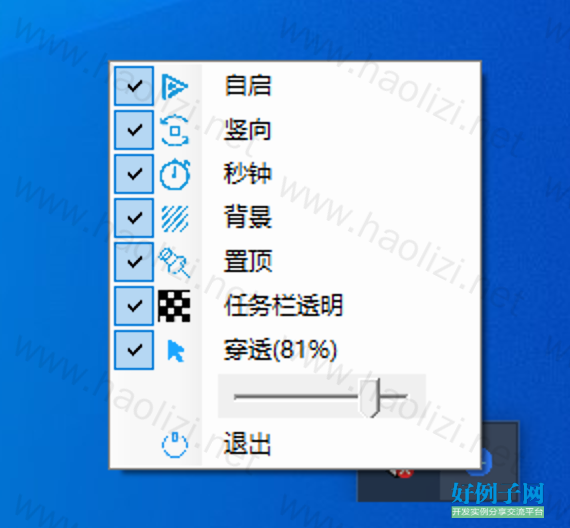
1、开机自启动(如无效,请使用管理员模式运行)
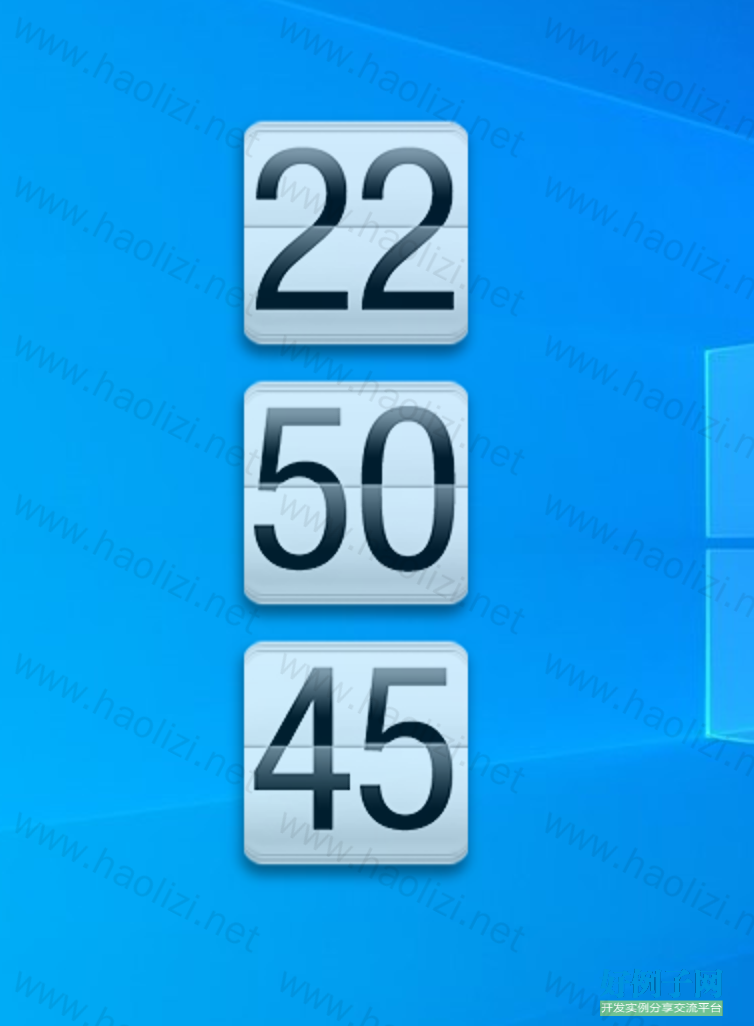
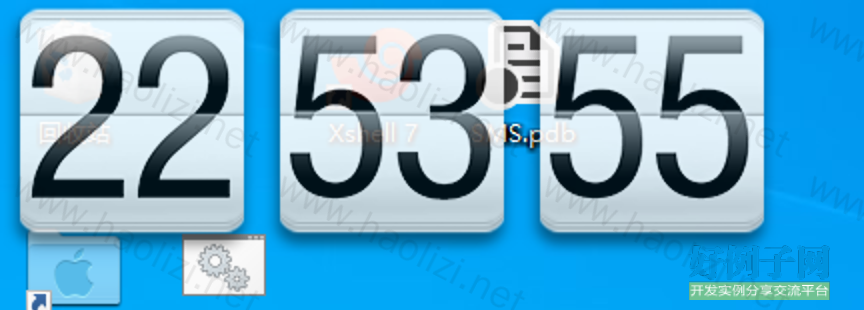
2、横向和竖向显示
3、是否显示秒钟
4、是否显示背景
5、窗口置顶
6、任务栏透明
7、窗口是否鼠标穿透(取消穿透可以拖动窗口;双击窗口或通知栏图标会切换窗口穿透)
8、窗口透明度
9、记录窗口位置(支持多屏)
10、修改窗口大小,有两个模式:自由拖动和滚动鼠标滚轮(都需在非鼠标穿透模式)且记录窗口大小
【实例截图】


【核心代码】
using Startup;
using System;
using System.IO;
using System.Runtime.InteropServices;
using System.Windows;
using System.Windows.Controls;
using System.Windows.Forms;
using System.Windows.Interop;
using TaskbarsAlpha;
using Orientation = System.Windows.Controls.Orientation;

namespace Timer
{
    /// <summary>
    /// App.xaml 的交互逻辑
    /// </summary>
    public partial class App : System.Windows.Application
    {
        public string inipath = AppDomain.CurrentDomain.SetupInformation.ApplicationBase   @"Setting.ini";
        public System.Windows.Media.Brush Background;
        public MainWindow frm;
        private static NotifyIcon trayIcon;

        ///win32 api
        private const uint WS_EX_LAYERED = 0x80000;
        private const int WS_EX_TRANSPARENT = 0x20;
        private const int GWL_EXSTYLE = (-20);

        [DllImport("user32", EntryPoint = "SetWindowLong")]
        private static extern uint SetWindowLong(IntPtr hwnd, int nIndex, uint dwNewLong);

        [DllImport("user32", EntryPoint = "GetWindowLong")]
        public static extern uint GetWindowLong(IntPtr hwnd, int nIndex);
        public ContextMenuStrip menu = new ContextMenuStrip();
        public ToolStripMenuItem closeItem = new ToolStripMenuItem();
        public ToolStripMenuItem topitem = new ToolStripMenuItem();
        public ToolStripMenuItem shubiaoct = new ToolStripMenuItem();
        public ToolStripMenuItem xuanzhuan = new ToolStripMenuItem();
        public ToolStripMenuItem onlytxt = new ToolStripMenuItem();
        public ToolStripMenuItem showss = new ToolStripMenuItem();
        public ToolStripMenuItem taskbaralpha = new ToolStripMenuItem();
        public ToolStripMenuItem startup_ = new ToolStripMenuItem();
        public TrackBar tr = new TrackBar();
        System.Threading.Mutex mutex;

        protected override void OnStartup(StartupEventArgs e)
        {
            LoadResourceDll.RegistDLL();
            base.OnStartup(e);
        }
        private void ApplicationStartup(object sender, StartupEventArgs e)
        {
            mutex = new System.Threading.Mutex(true, "Timer");
            if (!mutex.WaitOne(0, false))
            {
                this.Shutdown();
            }

            RemoveTrayIcon();
            AddTrayIcon();
        }
        public void AddTrayIcon()
        {
            if (trayIcon != null)
            {
                return;
            }

            trayIcon = new NotifyIcon
            {
                Icon = Timer.Properties.Resources.ico,
                Text = "时间"
            };
            trayIcon.Visible = true;
            trayIcon.DoubleClick  = TrayIcon_Click;

            menu.ShowCheckMargin = true;

            menu.Opened  = Menu_Opened;
            menu.Closed  = Menu_Closed;
            closeItem.Text = "退出";
            closeItem.Click  = new EventHandler(delegate { this.Shutdown(); });
            closeItem.Image = Timer.Properties.Resources.exit;

            shubiaoct.Checked = true;
            shubiaoct.Text = "穿透";
            shubiaoct.Click  = new EventHandler(delegate { this.shubiao(); });
            shubiaoct.Image = Timer.Properties.Resources.shubiao;

            topitem.Checked = true;
            topitem.Text = "置顶";
            topitem.Click  = new EventHandler(delegate { this.top(); });
            topitem.Image = Timer.Properties.Resources.top;

            xuanzhuan.Text = "竖向";
            xuanzhuan.Checked = true;
            xuanzhuan.Click  = new EventHandler(delegate { this.xuanzh(); });
            xuanzhuan.Image = Timer.Properties.Resources.change;

            onlytxt.Text = "背景";
            onlytxt.Checked = true;
            onlytxt.Click  = new EventHandler(delegate { this.onlyshowtxt(); });
            onlytxt.Image = Timer.Properties.Resources.empty;

            showss.Checked = true;
            showss.Text = "秒钟";
            showss.Click  = new EventHandler(delegate { this.showss_(); });
            showss.Image = Timer.Properties.Resources.ss;

            taskbaralpha.Checked = true;
            taskbaralpha.Text = "任务栏透明";
            taskbaralpha.Click  = new EventHandler(delegate { this.settaskbaralpha(); });
            taskbaralpha.Image = Timer.Properties.Resources.tm;


            startup_.Checked = true;
            startup_.Text = "自启";
            startup_.Click  = new EventHandler(delegate { this.autorun_(); });
            startup_.Image = Timer.Properties.Resources.autorun;

            tr.AutoSize = false;
            tr.Height = 22;
            tr.Maximum = 100;
            tr.Minimum = 0;
            tr.SmallChange = 5;
            tr.TickStyle = TickStyle.None;
            ToolStripControlHost tsc = new ToolStripControlHost(tr);
            menu.Items.Add(startup_);
            menu.Items.Add(xuanzhuan);
            menu.Items.Add(showss);
            menu.Items.Add(onlytxt);
            menu.Items.Add(topitem);
            menu.Items.Add(taskbaralpha);
            menu.Items.Add(shubiaoct);
            menu.Items.Add(tsc);
            menu.Items.Add(closeItem);
            tr.Scroll  = new System.EventHandler(trackBar1_Scroll);

            trayIcon.ContextMenuStrip = menu;    //设置NotifyIcon的右键弹出菜单

        }
        public bool show = false;
        private void Menu_Closed(object sender, ToolStripDropDownClosedEventArgs e)
        {
            show = false;
        }

        private void Menu_Opened(object sender, EventArgs e)
        {
            show = true;
        }

        private void TrayIcon_Click(object sender, EventArgs e)
        {
            shubiao();
        }

        public void autorun_()
        {
            startup_.Checked = !startup_.Checked;
            Startup_.InitializeOptions(startup_.Checked);
            saveinfo("_自启", startup_.Checked);
        }

        public void showss_()
        {
            (frm.images.Parent as DockPanel).Visibility = showss.Checked ? Visibility.Hidden : Visibility.Visible;
            showss.Checked = !showss.Checked;
            saveinfo("_秒钟", showss.Checked);
        }
        public void trackBar1_Scroll(object sender, EventArgs e)
        {
            MainWindow.Opacity = tr.Value / 100.00;
            shubiaoct.Text = "穿透("   (int)(MainWindow.Opacity * 100.00)   "%)";
            saveinfo("_透明度", tr.Value);
        }

        public void settaskbaralpha()
        {
            taskbaralpha.Checked = !taskbaralpha.Checked;
            TT.InitializeOptions(taskbaralpha.Checked);
            saveinfo("_任务栏透明", taskbaralpha.Checked);
        }

        public void onlyshowtxt()
        {
            (frm.imageh.Parent as DockPanel).Background = onlytxt.Checked ? null : Background;
            (frm.imagem.Parent as DockPanel).Background = onlytxt.Checked ? null : Background;
            (frm.images.Parent as DockPanel).Background = onlytxt.Checked ? null : Background;
            onlytxt.Checked = !onlytxt.Checked;
            saveinfo("_背景", onlytxt.Checked);
        }
        public void xuanzh()
        {
            xuanzhuan.Checked = !xuanzhuan.Checked;
            ChangeFX();
            saveinfo("_竖向", xuanzhuan.Checked);
        }
        public void top()
        {
            MainWindow.Topmost = !MainWindow.Topmost;
            topitem.Checked = MainWindow.Topmost;
            saveinfo("_置顶", topitem.Checked);
        }
        public void shubiao()
        {
            shubiaoct.Checked = !shubiaoct.Checked;
            saveinfo("_穿透", shubiaoct.Checked);
            ct();
            frm.ResizeMode = shubiaoct.Checked ? ResizeMode.NoResize : ResizeMode.CanResizeWithGrip;
        }
        public void ct()
        {
            bool f = shubiaoct.Checked;
            IntPtr hwnd = new WindowInteropHelper(MainWindow).Handle;
            if (!f)
            {
                SetWindowLong(hwnd, GWL_EXSTYLE, 0);
            }
            else
            {
                SetWindowLong(hwnd, GWL_EXSTYLE, WS_EX_TRANSPARENT | WS_EX_LAYERED);
            }
        }

        private void RemoveTrayIcon()
        {
            if (trayIcon != null)
            {
                trayIcon.Visible = false;
                trayIcon.Dispose();
                trayIcon = null;
            }
        }

        private void ApplicationExit(object sender, ExitEventArgs e)
        {
            if (!mutex.WaitOne(0, false))
            {
                return;
            }
            RemoveTrayIcon();
            saveinfo();
        }
        public void saveinfo()
        {
            var ini = new IniFile();
            ini["_Setting"]["_自启"] = startup_.Checked;
            ini["_Setting"]["_竖向"] = xuanzhuan.Checked;
            ini["_Setting"]["_秒钟"] = showss.Checked;
            ini["_Setting"]["_背景"] = onlytxt.Checked;
            ini["_Setting"]["_置顶"] = topitem.Checked;
            ini["_Setting"]["_任务栏透明"] = taskbaralpha.Checked;
            ini["_Setting"]["_穿透"] = shubiaoct.Checked;
            ini["_Setting"]["_透明度"] = tr.Value;
            if (frm != null)
            {
                ini["_Setting"]["X"] = frm.Left;
                ini["_Setting"]["Y"] = frm.Top;
                ini["_Setting"]["W"] = frm.Width;
                ini["_Setting"]["H"] = frm.Height;
            }
            ini.Save(inipath);
        }

        public void saveinfo(string key, double value)
        {
            var ini = new IniFile();
            if (File.Exists(inipath))
                ini.Load(inipath);
            ini["_Setting"][key] = value;
            ini.Save(inipath);
        }
        public void saveinfo(string key, bool value)
        {
            var ini = new IniFile();
            if (File.Exists(inipath))
                ini.Load(inipath);
            ini["_Setting"][key] = value;
            ini.Save(inipath);
        }

        private void ChangeFX()
        {
            double tmp = MainWindow.Height;
            MainWindow.Height = MainWindow.Width;
            MainWindow.Width = tmp;
            frm.wrappanel1.Orientation = frm.wrappanel1.Orientation == Orientation.Horizontal ? Orientation.Vertical : Orientation.Horizontal;
        }

        public void ChangeSize(bool flag)
        {
            double diameter = 0.90;
            if (flag)
                diameter = 1.10;
            frm.Width = frm.Width * diameter;
            frm.Height = frm.Height * diameter;
        }

    }
}
好例子网口号:伸出你的我的手 — 分享!
小贴士
感谢您为本站写下的评论,您的评论对其它用户来说具有重要的参考价值,所以请认真填写。
- 类似“顶”、“沙发”之类没有营养的文字,对勤劳贡献的楼主来说是令人沮丧的反馈信息。
- 相信您也不想看到一排文字/表情墙,所以请不要反馈意义不大的重复字符,也请尽量不要纯表情的回复。
- 提问之前请再仔细看一遍楼主的说明,或许是您遗漏了。
- 请勿到处挖坑绊人、招贴广告。既占空间让人厌烦,又没人会搭理,于人于己都无利。
关于好例子网
本站旨在为广大IT学习爱好者提供一个非营利性互相学习交流分享平台。本站所有资源都可以被免费获取学习研究。本站资源来自网友分享,对搜索内容的合法性不具有预见性、识别性、控制性,仅供学习研究,请务必在下载后24小时内给予删除,不得用于其他任何用途,否则后果自负。基于互联网的特殊性,平台无法对用户传输的作品、信息、内容的权属或合法性、安全性、合规性、真实性、科学性、完整权、有效性等进行实质审查;无论平台是否已进行审查,用户均应自行承担因其传输的作品、信息、内容而可能或已经产生的侵权或权属纠纷等法律责任。本站所有资源不代表本站的观点或立场,基于网友分享,根据中国法律《信息网络传播权保护条例》第二十二与二十三条之规定,若资源存在侵权或相关问题请联系本站客服人员,点此联系我们。关于更多版权及免责申明参见 版权及免责申明

网友评论
我要评论