


实例介绍
【实例简介】
【实例截图】
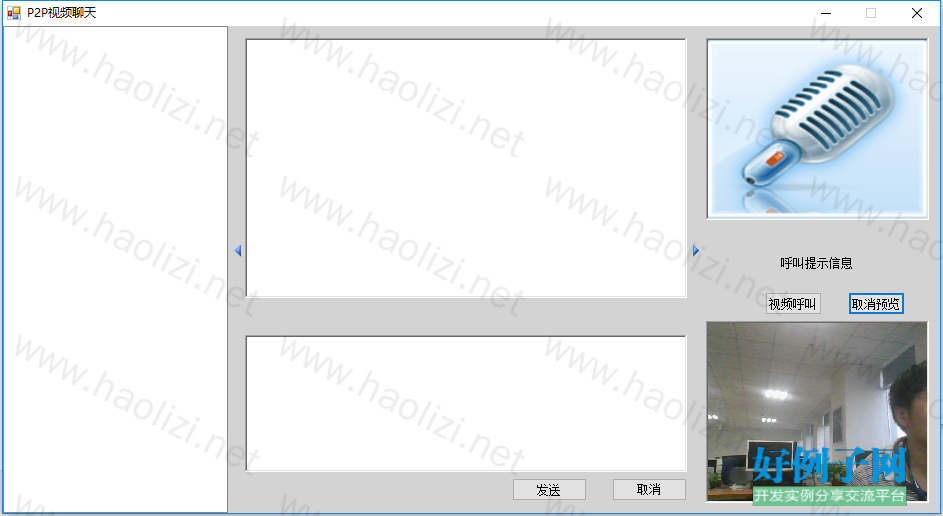
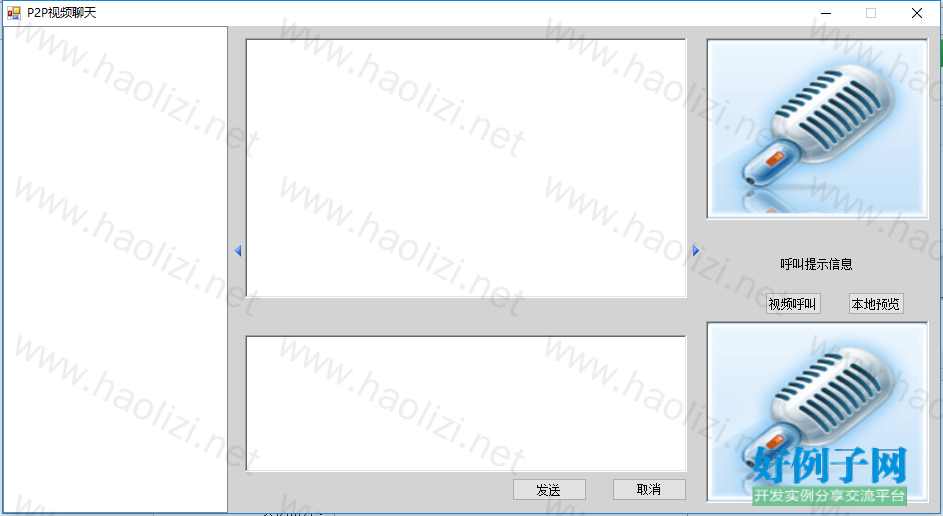
【核心代码】
using System;
using System.Collections.Generic;
using System.Drawing;
using System.Text;
using System.Windows.Forms;
using System.Threading;
using System.Net.Sockets;
using System.Net.PeerToPeer;
using System.Net;
using System.IO;
using System.Drawing.Imaging;
using P2PVideo.Properties;
namespace P2PVideo
{
public partial class MainForm : Form
{
/************摄像机用****************/
//摄像机对象
WebCamera myCamera = new WebCamera();
//摄像机编号
int device_number = 0;
//是否正在预览
bool bLocalShow = false;
//是否进行视频呼叫
bool bCallRemote = false;
IDataObject data;
Image bmap;
User user;
/************对等通信用*************/
//自定义对等点名称
String strpeerName = "Myp2pVedio";
TcpListener listener;
List<ListViewItem> resolvedListViewItem = new List<ListViewItem>();
TcpClient localclient;
BinaryWriter localbw;
BinaryReader localbr;
NetworkStream localsr;
String remotePort = "";
String remoteIP = "";
Thread thredRece;
Thread thredListen;
MemoryStream receiveMS;
int receiveLength;
UdpChat udpChat;
bool isExit = false;
static int listViewWidth = 225;
public MainForm()
{
InitializeComponent();
this.FormBorderStyle = FormBorderStyle.FixedSingle;
this.MaximizeBox = false;
registerAndResolve();
udpChat = new UdpChat(this);
}
private void registerAndResolve()
{
getPort();
//将本应用使用的IP地址及端口号,注册到群中
if (!MyPNRP.registerPeer(strpeerName))
MessageBox.Show("未开启点对点服务");
//定期解析对等点所在群的同名对等节点的信息
Thread resolveThread = new Thread(Resolve);
resolveThread.Start();
resolveThread.IsBackground = true;
Start_Receiving_Video_Conference();
}
/// <summary>
/// 获取一个可用端口号,启动监听
/// </summary>
public void getPort()
{
while (true)
{
//设置本应用使用的端口号
MyPNRP.port = new Random().Next(50000, 51000);
try
{
listener = new TcpListener(IPAddress.Any, MyPNRP.port);
listener.Start();
}
catch
{
continue;
}
break;
}
}
/// <summary>
/// 解析名称
/// </summary>
private void Resolve()
{
while (!isExit)
{
PeerNameRecordCollection recColl = MyPNRP.ResolverPeer(strpeerName);
resolvedListViewItem.Clear();
foreach (PeerNameRecord record in recColl)
{
foreach (IPEndPoint endP in record.EndPointCollection)
{
if (endP.AddressFamily.Equals(AddressFamily.InterNetwork))
{
ListViewItem item1 = new ListViewItem(endP.ToString());
resolvedListViewItem.Add(item1);
}
}
}
//检查是否有其他终端退出,如已经退出则从列表中删除该项
if (resolvedListViewItem.Count == 0)
ClearItems();
else
RemoveItem();
foreach (PeerNameRecord record in recColl)
{
foreach (IPEndPoint endP in record.EndPointCollection)
{
if (endP.AddressFamily.Equals(AddressFamily.InterNetwork))
{
ListViewItem item1 = new ListViewItem(endP.ToString());
AppendItem(item1);
}
}
}
}
}
/// <summary>
/// 界面控制
/// </summary>
/// <param name="sender"></param>
/// <param name="e"></param>
private void buttonShowUsers_Click(object sender, EventArgs e)
{
splitContainer1.Panel1Collapsed = !splitContainer1.Panel1Collapsed;
//由展开变为折叠
if (splitContainer1.Panel1Collapsed)
{
this.ClientSize = new Size(this.ClientSize.Width - 200, this.ClientSize.Height);
splitContainer1.Width = buttonShowUsers.Width;
buttonShowUsers.Image = Properties.Resources.MovePreviousHS;
}
//由折叠变为展开
else
{
this.ClientSize = new Size(this.ClientSize.Width 200, this.ClientSize.Height);
buttonShowUsers.Image = Properties.Resources.MoveNextHS;
splitContainer1.SplitterDistance = this.listViewUsers.Width;
}
}
/// <summary>
/// 界面控制
/// </summary>
private void buttonShowVideo_Click(object sender, EventArgs e)
{
splitContainer2.Panel2Collapsed = !splitContainer2.Panel2Collapsed;
////由展开变为折叠
if (splitContainer2.Panel2Collapsed)
{
this.ClientSize = new Size(this.ClientSize.Width - 220, this.ClientSize.Height);
buttonShowVideo.Image = Properties.Resources.MoveNextHS;
splitContainer1.SplitterDistance = listViewWidth;
}
////由折叠变为展开
else
{
this.ClientSize = new Size(this.ClientSize.Width 220, this.ClientSize.Height);
buttonShowVideo.Image = Properties.Resources.MovePreviousHS;
splitContainer1.SplitterDistance = listViewWidth;
}
}
private void buttonSend_Click(object sender, EventArgs e)
{
try
{
remoteIP = listViewUsers.SelectedItems[0].ToString().Split(':')[1];
remoteIP = remoteIP.Substring(2, remoteIP.Length - 2);
udpChat.sendData(remoteIP, remotePort, this.richTextBoxSend.Text);
}
catch
{
MessageBox.Show("选择正确接收方!");
}
}
/// <summary>
/// 清空按钮
/// </summary>
private void buttonClose_Click(object sender, EventArgs e)
{
this.richTextBoxSend.Text = "";
}
/// <summary>
/// 视频呼叫/取消呼叫
/// </summary>
private void buttonVedioCall_Click(object sender, EventArgs e)
{
if (!bCallRemote)
{
//询问远程主机是否接受呼叫请求
try
{
remotePort = this.listViewUsers.SelectedItems[0].ToString().Split(':')[2].Substring(0, 5);
remoteIP = listViewUsers.SelectedItems[0].ToString().Split(':')[1];
remoteIP = remoteIP.Substring(2, remoteIP.Length - 2);
}
catch (Exception ex)
{
Console.WriteLine(ex.ToString());
MessageBox.Show("未选择远程主机");
return;
}
//尝试打开本地摄像头进行预览
if (bLocalShow == false && Start_Sending_Video_Conference())
{
if (LocalVedioShow())
{
bLocalShow = true;
this.buttonLocalShow.Text = "取消预览";
}
}
}
else
{
labelTips.Text = "视频中断";
if (localclient != null)
{
try
{
timerSend.Stop();
buttonLocalShow_Click(null, null);
localbw.Write("Stop:false");
localclient.Close();
localbw.Close();
localsr.Close();
localbr.Close();
}
catch (Exception ex)
{
//发生异常意味着远程连接已经关闭,无需视频中断
Console.WriteLine(ex.ToString());
}
}
this.buttonVedioCall.Text = "视频呼叫";
bCallRemote = false;
}
}
/// <summary>
/// 开始发送数据
/// </summary>
private bool Start_Sending_Video_Conference()
{
try
{
localclient = new TcpClient(remoteIP, int.Parse(remotePort));//Connecting with server
localsr = localclient.GetStream();
localbw = new BinaryWriter(localsr);
localbr = new BinaryReader(localsr);
localbw.Write("Query:false");
if (localbr.ReadString() == "OK:false")
{
timerSend.Enabled = true;
timerSend.Start();
labelTips.Text = "开始视频发送";
this.buttonVedioCall.Text = "中断视频";
bCallRemote = true;
return true;
}
else
{
this.buttonVedioCall.Text = "视频呼叫";
labelTips.Text = "远程主机未对视频请求做出响应";
localbw.Close();
localbr.Close();
return false;
}
}
catch (Exception ex)
{
Console.WriteLine(ex.ToString());
this.buttonVedioCall.Text = "视频呼叫";
labelTips.Text = "远程主机未对视频请求做出响应";
return false;
}
}
/// <summary>
/// 准备接收视频
/// </summary>
private void Start_Receiving_Video_Conference()
{
thredListen = new Thread(ReceiveConnect); // Start Thread Session
thredListen.Start();
thredListen.IsBackground = true;
}
/// <summary>
/// 接收连接请求
/// </summary>
private void ReceiveConnect()
{
while (!isExit)
{
TcpClient remoteClient = listener.AcceptTcpClient();
isExit = false;
user = new User(remoteClient);
thredRece = new Thread(ReceiveMessage);
thredRece.IsBackground = true;
thredRece.Start(user);
}
}
/// <summary>
/// 接收信息
/// </summary>
private void ReceiveMessage(Object myUser)
{
User user = (User)myUser;
while (!isExit)
{
//保存接收的命令字符串
string receiveString = null;
//解析命令用
//每条命令均带有一个参数,值为true或者false,表示是否有紧跟的字节数组
string[] splitString = null;
byte[] receiveBytes = null;
try
{
//从网络流中读出命令字符串
//此方法会自动判断字符串长度前缀,并根据长度前缀读出字符串
receiveString = user.br.ReadString();
splitString = receiveString.Split(':');
if (splitString[1] == "true")
{
//先从网络流中读出32位的长度前缀
receiveLength = user.br.ReadInt32();
//然后读出指定长度的内容保存到字节数组中
receiveBytes = user.br.ReadBytes(receiveLength);
}
}
catch (Exception ex)
{
Console.WriteLine(ex.ToString());
this.pictureBoxFriend.Image = (System.Drawing.Image)Resources.ResourceManager.GetObject("vedio");
break;
//底层套接字不存在时会出现异常
SetlabelTips("接收数据失败");
}
if (receiveString == null)
{
if (isExit == false)
{
this.pictureBoxFriend.Image = (System.Drawing.Image)Resources.ResourceManager.GetObject("vedio");
SetlabelTips("接收数据失败");
}
break;
}
SetlabelTips("收到:" receiveString);
switch (splitString[0])
{
case "Query":
//询问是否接受视频请求
if (MessageBox.Show(String.Format("接收{0}视频请求", user.remoteClient.Client.RemoteEndPoint), "消息", MessageBoxButtons.YesNo) == DialogResult.Yes)
{
user.bw.Write("OK:false");
}
else
user.bw.Write("NO:false");
break;
case "Image":
//传递图片
try
{
//利用接收到得字节数组创建内存流
receiveMS = new MemoryStream(receiveBytes);
//从流中获取图片
this.pictureBoxFriend.Image = Image.FromStream(receiveMS);
//关闭内存流
receiveMS.Close();
//清空内存流
receiveMS.Flush();
//重置内存流
receiveMS = null;
}
catch (Exception ex)
{
MessageBox.Show("接收图片错误");
Console.WriteLine(ex.ToString());
break;
}
break;
case "Stop":
//停止接收视频
this.pictureBoxFriend.Image = (System.Drawing.Image)Resources.ResourceManager.GetObject("vedio");
isExit = true;
break;
default:
break;
}
}
}
/// <summary>
/// 视频预览事件
/// </summary>
/// <param name="sender"></param>
/// <param name="e"></param>
private void buttonLocalShow_Click(object sender, EventArgs e)
{
//开始预览
if (bLocalShow == false)
{
if (LocalVedioShow())
{
bLocalShow = true;
this.buttonLocalShow.Text = "取消预览";
}
}
//停止视频预览
else
{
myCamera.ClosePreviewWindow();
bLocalShow = false;
this.buttonLocalShow.Text = "本地预览";
}
}
/// <summary>
/// 显示本地视频
/// </summary>
/// <returns>摄像头是否运行正常</returns>
private bool LocalVedioShow()
{
//设定设备信息
myCamera.IDevice = device_number;
//开始在本地预览显示
if (!myCamera.OpenPreviewWindow(this.picCaptureMine))
{
MessageBox.Show("视频预览失败!请检查摄像头设备是否连接正常,驱动是否安装!");
return false;
}
return true;
}
/// <summary>
/// 窗体关闭
/// </summary>
private void FormP2P_FormClosing(object sender, FormClosingEventArgs e)
{
isExit = true;
if (timerSend.Enabled)
{
timerSend.Stop();
timerSend.Enabled = false;
}
if (localclient != null)
{
if (localclient.Connected)
localclient.Close();
}
if (user != null)
{
user.remoteClient.Close();
user.br.Close();
user.bw.Close();
}
myCamera.ClosePreviewWindow();
}
/// <summary>
/// 发送视频数据
/// </summary>
private void Send_One_Capture(BinaryWriter bw)
{
//将字节数组存放到内存流中
MemoryStream ms = new MemoryStream();
try
{
//将摄像头的一帧数据存放到剪贴板中
myCamera.CaptureWindow();
//从剪贴板中获取图片
data = Clipboard.GetDataObject();
//将截图存放到内存流中
if (data.GetDataPresent(typeof(System.Drawing.Bitmap)))
{
bmap = ((Image)(data.GetData(typeof(System.Drawing.Bitmap))));
bmap.Save(ms, ImageFormat.Bmp);
}
//将截图以JPEG形式保存到内存流中
this.picCaptureMine.Image.Save(ms, System.Drawing.Imaging.ImageFormat.Jpeg);
//从流中获取字节数组
byte[] arrImage = ms.GetBuffer();
bw.Write("Image:true");
//写入数据长度
bw.Write(arrImage.Length);
//发送图片
bw.Write(arrImage);
ms.Flush();
bw.Flush();
}
catch (Exception ex)
{
Console.WriteLine(ex.ToString());
buttonVedioCall_Click(null, null);
bw.Close();
}
ms.Close();
}
private void timerSend_Tick(object sender, EventArgs e)
{
Send_One_Capture(localbw);
}
/// <summary>
/// 多线程访问控件
/// </summary>
/// <param name="item"></param>
delegate void AppendItemDelegate(ListViewItem item);
public void AppendItem(ListViewItem item)
{
if (listViewUsers.InvokeRequired)
{
AppendItemDelegate d = AppendItem;
listViewUsers.Invoke(d, item);
}
else
{
Boolean exist = false;
foreach (ListViewItem myitem in listViewUsers.Items)
{
if (myitem.Text.Equals(item.Text))
{
exist = true;
}
}
if (!exist)
listViewUsers.Items.Add(item);
}
}
/// <summary>
/// 删除已经推出对等点的ListItem项
/// </summary>
delegate void RemoveItemDelegate();
public void RemoveItem()
{
if (listViewUsers.InvokeRequired)
{
RemoveItemDelegate d = RemoveItem;
listViewUsers.Invoke(d);
}
else
{
bool exist;
foreach (ListViewItem itemUser in listViewUsers.Items)
{
exist = false;
foreach (ListViewItem itemResolveNew in resolvedListViewItem)
{
if (itemUser.Text.Equals(itemResolveNew.Text))
{
exist = true;
break;
}
}
if (!exist)
listViewUsers.Items.Remove(itemUser);
}
}
}
/// <summary>
/// 清空所有ListItem项
/// </summary>
delegate void ClearItemDelegate();
public void ClearItems()
{
if (listViewUsers.InvokeRequired)
{
ClearItemDelegate d = ClearItems;
listViewUsers.Invoke(d);
}
else
{
listViewUsers.Items.Clear();
}
}
/// <summary>
/// 清空发送框
/// </summary>
delegate void ClearRichTextBoxSendDelegate();
public void ClearRichTextBox()
{
if (this.richTextBoxSend.InvokeRequired)
{
ClearRichTextBoxSendDelegate d = ClearRichTextBox;
richTextBoxSend.Invoke(d);
}
else
{
richTextBoxSend.Clear();
richTextBoxSend.Focus();
}
}
delegate void SetRichTextBoxReceiveDelegate(String text);
public void SetRichTextBoxReceive(String text)
{
if (this.richTextBoxSend.InvokeRequired)
{
SetRichTextBoxReceiveDelegate d = SetRichTextBoxReceive;
this.richTextBoxReceive.Invoke(d, text);
}
else
{
richTextBoxReceive.AppendText(text);
richTextBoxReceive.AppendText(Environment.NewLine);
}
}
delegate void SetlabelTipsDelegate(String text);
public void SetlabelTips(String text)
{
if (this.labelTips.InvokeRequired)
{
SetlabelTipsDelegate d = SetlabelTips;
this.labelTips.Invoke(d, text);
}
else
{
labelTips.Text = text;
}
}
}
}
好例子网口号:伸出你的我的手 — 分享!
相关软件
小贴士
感谢您为本站写下的评论,您的评论对其它用户来说具有重要的参考价值,所以请认真填写。
- 类似“顶”、“沙发”之类没有营养的文字,对勤劳贡献的楼主来说是令人沮丧的反馈信息。
- 相信您也不想看到一排文字/表情墙,所以请不要反馈意义不大的重复字符,也请尽量不要纯表情的回复。
- 提问之前请再仔细看一遍楼主的说明,或许是您遗漏了。
- 请勿到处挖坑绊人、招贴广告。既占空间让人厌烦,又没人会搭理,于人于己都无利。
关于好例子网
本站旨在为广大IT学习爱好者提供一个非营利性互相学习交流分享平台。本站所有资源都可以被免费获取学习研究。本站资源来自网友分享,对搜索内容的合法性不具有预见性、识别性、控制性,仅供学习研究,请务必在下载后24小时内给予删除,不得用于其他任何用途,否则后果自负。基于互联网的特殊性,平台无法对用户传输的作品、信息、内容的权属或合法性、安全性、合规性、真实性、科学性、完整权、有效性等进行实质审查;无论平台是否已进行审查,用户均应自行承担因其传输的作品、信息、内容而可能或已经产生的侵权或权属纠纷等法律责任。本站所有资源不代表本站的观点或立场,基于网友分享,根据中国法律《信息网络传播权保护条例》第二十二与二十三条之规定,若资源存在侵权或相关问题请联系本站客服人员,点此联系我们。关于更多版权及免责申明参见 版权及免责申明

网友评论
我要评论