


实例介绍
【实例简介】
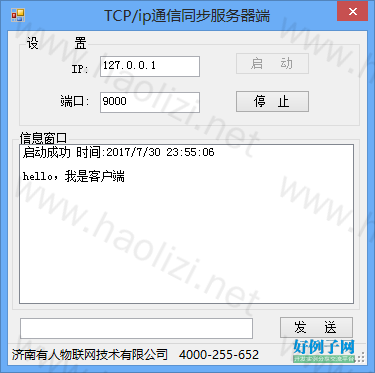
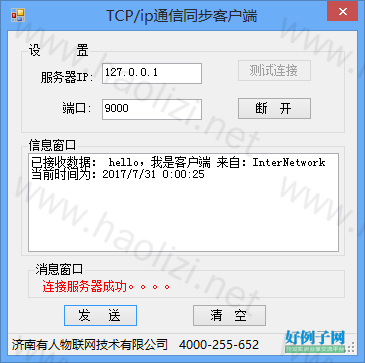
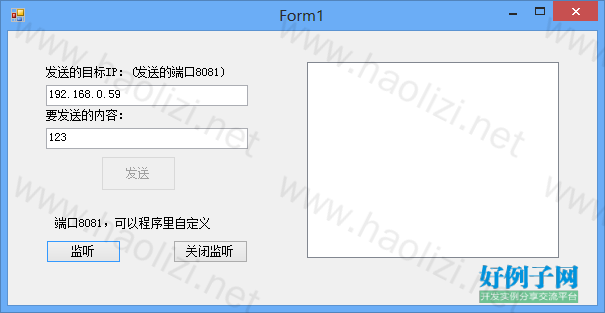
【实例截图】
TCP
【核心代码】
// *************************************
// * C# UDP通讯例程
// * 济南有人物联网技术有限公司提供
//**************************************
using System;
using System.Collections.Generic;
using System.ComponentModel;
using System.Data;
using System.Drawing;
using System.Text;
using System.Windows.Forms;
using System.Net;
using System.Net.Sockets;
using System.Threading;


namespace UDP_Server
{
    public partial class Form1 : Form
    {
        #region -字段-
        private static Socket my_socket;
        private static int LocalPort=8081;
        private static int RemotePort=8081;


        private static IPAddress m_GroupAddress_S;
        private static IPEndPoint m_RemoteEP;  //对方地址

       //rivate Thread th;

        private static byte[] receivebuffer;
        private static SocketAsyncEventArgs ReceiveSocketArgs;
        private static SocketAsyncEventArgs SendSocketArgs;
        #endregion

        #region -委托-
        delegate void SetTextCallback(string text);

        #endregion


        public Form1()
        {
            InitializeComponent();
            SendButton.Enabled = false;
        }

        /// <summary>
        /// 初始化UPDClient
        /// </summary>
        public void Initialize()
        {

            //
            // 实例化 socket
            //
            IPEndPoint m_localEP = new IPEndPoint(IPAddress.Any, LocalPort);
            my_socket = new Socket(AddressFamily.InterNetwork, SocketType.Dgram, ProtocolType.Udp);
            my_socket.Bind(m_localEP);
            //
            // 创建对方主机的终结点
            //
            m_GroupAddress_S = IPAddress.Parse(textBox_ip.Text); //要发送到的计算机IP
            m_RemoteEP = new IPEndPoint(m_GroupAddress_S, RemotePort);


            receivebuffer = new byte[1024];
            ReceiveSocketArgs = new SocketAsyncEventArgs();
            ReceiveSocketArgs.RemoteEndPoint = m_localEP;
            ReceiveSocketArgs.SetBuffer(receivebuffer, 0, receivebuffer.Length);
            ReceiveSocketArgs.Completed  =new EventHandler<SocketAsyncEventArgs>(ReceiveSocketArgs_Completed);


            SendSocketArgs = new SocketAsyncEventArgs();
            SendSocketArgs.Completed  = new EventHandler<SocketAsyncEventArgs>(SendSocketArgs_Completed);
        }


        #region -异步发送函数

        void SendSocketArgs_Completed(object sender, SocketAsyncEventArgs e)
        {
            switch (e.LastOperation)
            {
                case SocketAsyncOperation.SendTo:
                    this.ProcessSent(e);
                    break;
                default:
                    throw new ArgumentException("The last operation completed on the socket was not a send");
            }
        }

       /// <summary>
       /// 发送后的处理
       /// </summary>
       /// <param name="e"></param>
        private void ProcessSent(SocketAsyncEventArgs e)
        {

            if (e.BytesTransferred > 0 && e.SocketError == SocketError.Success)
            {

                String strData = "send message";
                if (this.listBox1.InvokeRequired)
                {
                    SetTextCallback d = new SetTextCallback(SetText);

                    this.Invoke(d, new object[] { strData });
                }
                else
                {
                    listBox1.Items.Add(strData);
                }
            }


        }
        #endregion

        #region -异步接收函数-

        /// <summary>
        /// 开始接收数据
        /// </summary>
        public void StartReceive()
        {
            String strData = "receive ";
            if (this.listBox1.InvokeRequired)
            {
                SetTextCallback d = new SetTextCallback(SetText);

                this.Invoke(d, new object[] { strData });
            }
            else
            {
                listBox1.Items.Add(strData);
            }
            try
            {

                if (!my_socket.ReceiveFromAsync(ReceiveSocketArgs))
                {
                    processReceived(ReceiveSocketArgs);
                }
            }
            catch
            {

            }

        }


        void ReceiveSocketArgs_Completed(object sender, SocketAsyncEventArgs e)
        {
            String strData = "receive Completed";
            if (this.listBox1.InvokeRequired)
            {
                SetTextCallback d = new SetTextCallback(SetText);

                this.Invoke(d, new object[] { strData });
            }
            else
            {
                listBox1.Items.Add(strData);
            }
            switch (e.LastOperation)
            {
                case SocketAsyncOperation.ReceiveFrom:
                    this.processReceived(e);
                    break;
                default:
                    throw new ArgumentException("The last operation completed on the socket was not a receive");
            }
        }

        void processReceived(SocketAsyncEventArgs e)
        {
            if (e.BytesTransferred > 0 && e.SocketError == SocketError.Success)
            {
                Int32 byteTransferred = e.BytesTransferred;
                String strData = Encoding.ASCII.GetString(e.Buffer,0,byteTransferred);
                if (this.listBox1.InvokeRequired)
                {
                    SetTextCallback d = new SetTextCallback(SetText);

                    this.Invoke(d, new object[] { strData});
                }
                else
                {
                    listBox1.Items.Add(strData);
                }
            }

           StartReceive();
        }
        #endregion

        /// <summary>
        /// 监听函数,用来接收消息
        /// </summary>
        public void Listener()
        {
          /*
           //同步处理
            while (true)
            {
                int recv;
                IPEndPoint endpoint = new IPEndPoint(IPAddress.Any,0);
                EndPoint Remote = (EndPoint)(endpoint);
                Byte[] data = new Byte[1024];
                recv = my_socket.ReceiveFrom(data, ref Remote);//接收数据
                String strData = Encoding.ASCII.GetString(data);

                if (this.listBox1.InvokeRequired)
                {
                    SetTextCallback d = new SetTextCallback(SetText);
                    this.Invoke(d, new object[] { strData });
                }
                else
                {
                    listBox1.Items.Add(strData);
                }

            }
           */

            //异步处理
            StartReceive();
        }

        private void SetText(string text)
        {
            listBox1.Items.Add(text);
        }

        #region -事件响应函数-

        private void ListenButton_Click(object sender, EventArgs e)
        {
            Initialize();
            //同步线程法
            //th = new Thread(new ThreadStart(Listener));
            //th.Start();

            Listener();
            this.ListenButton.Enabled = false;
            SendButton.Enabled = true;
        }

        private void SendButton_Click(object sender, EventArgs e)
        {
            Byte[] buffer = null;

            Encoding ASCII = Encoding.ASCII;

            string s = textEdit.Text;

            buffer = new Byte[s.Length   1];
            //
            // 将数据发送给远程对方主机
            //

            int len = ASCII.GetBytes(s.ToCharArray(), 0, s.Length, buffer, 0);
            //EndPoint Remote = (EndPoint)(m_RemoteEP);

            //同步发送
           // my_socket.SendTo(buffer, len, SocketFlags.None, Remote);


            //异步发送
            SendSocketArgs.SetBuffer(buffer, 0, len);
            SendSocketArgs.RemoteEndPoint = m_RemoteEP;
            my_socket.SendToAsync(SendSocketArgs);
        }

        private void Form1_FormClosed(object sender, FormClosedEventArgs e)
        {
            try
            {
                /*
                try
                {
                    if (th != null)
                    {
                        if (th.IsAlive)
                        {
                            th.Abort();
                        }

                        th = null;

                    }

                }
                catch
                {
                    try
                    {
                        System.Threading.Thread.ResetAbort();
                    }
                    catch
                    { }
                }
                */

                my_socket.Close();
            }
            catch
            {
            }

        }

        private void StopButton_Click(object sender, EventArgs e)
        {
            try
            {
                /*
                try
                {
                    if (th != null)
                    {
                        if (th.IsAlive)
                        {
                            th.Abort();
                        }

                        th = null;

                    }

                }
                catch
                {
                    try
                    {
                        System.Threading.Thread.ResetAbort();
                    }
                    catch
                    { }
                }
                */
                my_socket.Close();
                ListenButton.Enabled = true;
                SendButton.Enabled = false;
            }
            catch
            {
            }
        }

        #endregion

        private void label2_Click(object sender, EventArgs e)
        {

        }

    }


}
好例子网口号:伸出你的我的手 — 分享!
相关软件
小贴士
感谢您为本站写下的评论,您的评论对其它用户来说具有重要的参考价值,所以请认真填写。
- 类似“顶”、“沙发”之类没有营养的文字,对勤劳贡献的楼主来说是令人沮丧的反馈信息。
- 相信您也不想看到一排文字/表情墙,所以请不要反馈意义不大的重复字符,也请尽量不要纯表情的回复。
- 提问之前请再仔细看一遍楼主的说明,或许是您遗漏了。
- 请勿到处挖坑绊人、招贴广告。既占空间让人厌烦,又没人会搭理,于人于己都无利。
关于好例子网
本站旨在为广大IT学习爱好者提供一个非营利性互相学习交流分享平台。本站所有资源都可以被免费获取学习研究。本站资源来自网友分享,对搜索内容的合法性不具有预见性、识别性、控制性,仅供学习研究,请务必在下载后24小时内给予删除,不得用于其他任何用途,否则后果自负。基于互联网的特殊性,平台无法对用户传输的作品、信息、内容的权属或合法性、安全性、合规性、真实性、科学性、完整权、有效性等进行实质审查;无论平台是否已进行审查,用户均应自行承担因其传输的作品、信息、内容而可能或已经产生的侵权或权属纠纷等法律责任。本站所有资源不代表本站的观点或立场,基于网友分享,根据中国法律《信息网络传播权保护条例》第二十二与二十三条之规定,若资源存在侵权或相关问题请联系本站客服人员,点此联系我们。关于更多版权及免责申明参见 版权及免责申明

网友评论
我要评论