


实例介绍
【实例简介】
【实例截图】
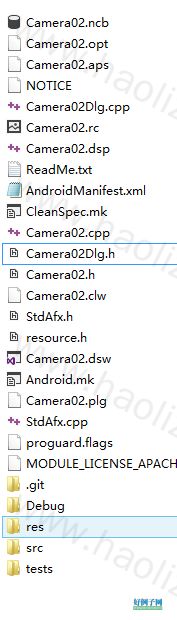
【核心代码】
// Camera02Dlg.cpp : implementation file
//

#include "stdafx.h"
#include "Camera02.h"
#include "Camera02Dlg.h"

#ifdef _DEBUG
#define new DEBUG_NEW
#undef THIS_FILE
static char THIS_FILE[] = __FILE__;
#endif

#include <vfw.h>
#pragma comment(lib, "vfw32")
/////////////////////////////////////////////////////////////////////////////
// CAboutDlg dialog used for App About

class CAboutDlg : public CDialog
{
public:
	CAboutDlg();

// Dialog Data
	//{{AFX_DATA(CAboutDlg)
	enum { IDD = IDD_ABOUTBOX };
	//}}AFX_DATA

	// ClassWizard generated virtual function overrides
	//{{AFX_VIRTUAL(CAboutDlg)
	protected:
	virtual void DoDataExchange(CDataExchange* pDX);    // DDX/DDV support
	//}}AFX_VIRTUAL

// Implementation
protected:
	//{{AFX_MSG(CAboutDlg)
	//}}AFX_MSG
	DECLARE_MESSAGE_MAP()
};

CAboutDlg::CAboutDlg() : CDialog(CAboutDlg::IDD)
{
	//{{AFX_DATA_INIT(CAboutDlg)
	//}}AFX_DATA_INIT
}

void CAboutDlg::DoDataExchange(CDataExchange* pDX)
{
	CDialog::DoDataExchange(pDX);
	//{{AFX_DATA_MAP(CAboutDlg)
	//}}AFX_DATA_MAP
}

BEGIN_MESSAGE_MAP(CAboutDlg, CDialog)
	//{{AFX_MSG_MAP(CAboutDlg)
		// No message handlers
	//}}AFX_MSG_MAP
END_MESSAGE_MAP()

/////////////////////////////////////////////////////////////////////////////
// CCamera02Dlg dialog

CCamera02Dlg::CCamera02Dlg(CWnd* pParent /*=NULL*/)
	: CDialog(CCamera02Dlg::IDD, pParent)
{
	//{{AFX_DATA_INIT(CCamera02Dlg)
		// NOTE: the ClassWizard will add member initialization here
	//}}AFX_DATA_INIT
	// Note that LoadIcon does not require a subsequent DestroyIcon in Win32
	m_hIcon = AfxGetApp()->LoadIcon(IDR_MAINFRAME);
}

void CCamera02Dlg::DoDataExchange(CDataExchange* pDX)
{
	CDialog::DoDataExchange(pDX);
	//{{AFX_DATA_MAP(CCamera02Dlg)
		// NOTE: the ClassWizard will add DDX and DDV calls here
	//}}AFX_DATA_MAP
}

BEGIN_MESSAGE_MAP(CCamera02Dlg, CDialog)
	//{{AFX_MSG_MAP(CCamera02Dlg)
	ON_WM_SYSCOMMAND()
	ON_WM_PAINT()
	ON_WM_QUERYDRAGICON()
	ON_BN_CLICKED(IDC_BUTTON_SET_CAMERA, OnButtonSetCamera)
	ON_BN_CLICKED(IDC_BUTTON_START_CAPTURE, OnButtonStartCapture)
	ON_BN_CLICKED(IDC_BUTTON_STOP_CAPTURE, OnButtonStopCapture)
	//}}AFX_MSG_MAP
END_MESSAGE_MAP()

/////////////////////////////////////////////////////////////////////////////
// CCamera02Dlg message handlers

BOOL CCamera02Dlg::OnInitDialog()
{
	CDialog::OnInitDialog();

	// Add "About..." menu item to system menu.

	// IDM_ABOUTBOX must be in the system command range.
	ASSERT((IDM_ABOUTBOX & 0xFFF0) == IDM_ABOUTBOX);
	ASSERT(IDM_ABOUTBOX < 0xF000);

	CMenu* pSysMenu = GetSystemMenu(FALSE);
	if (pSysMenu != NULL)
	{
		CString strAboutMenu;
		strAboutMenu.LoadString(IDS_ABOUTBOX);
		if (!strAboutMenu.IsEmpty())
		{
			pSysMenu->AppendMenu(MF_SEPARATOR);
			pSysMenu->AppendMenu(MF_STRING, IDM_ABOUTBOX, strAboutMenu);
		}
	}

	// Set the icon for this dialog.  The framework does this automatically
	//  when the application's main window is not a dialog
	SetIcon(m_hIcon, TRUE);			// Set big icon
	SetIcon(m_hIcon, FALSE);		// Set small icon

	// TODO: Add extra initialization here
	CWnd *pCarryWnd = this->GetDlgItem(IDC_STATIC_CAMERA);
	CRect rect;
	pCarryWnd->GetClientRect(&rect);
	m_hCameraWnd = capCreateCaptureWindow("MY PC CAMERA", WS_CHILD|WS_VISIBLE,
		                    0, 0, rect.Width(), rect.Width(),
		                    pCarryWnd->GetSafeHwnd(), 0);
	if(m_hCameraWnd == NULL)
	{
		AfxMessageBox("创建视频窗口失败!");
		return TRUE;
	}

	if(!capDriverConnect(m_hCameraWnd, 0)) return TRUE;
	CAPDRIVERCAPS cpas;
	capDriverGetCaps(m_hCameraWnd,sizeof(CAPDRIVERCAPS), &cpas);
	if(cpas.fCaptureInitialized)
	{
		CAPSTATUS status;
		capGetStatus(m_hCameraWnd, &status, sizeof(CAPSTATUS));
		capPreviewRate(m_hCameraWnd, 25);
		capPreview(m_hCameraWnd, TRUE);
	}

	return TRUE;  // return TRUE  unless you set the focus to a control
}

void CCamera02Dlg::OnSysCommand(UINT nID, LPARAM lParam)
{
	if ((nID & 0xFFF0) == IDM_ABOUTBOX)
	{
		CAboutDlg dlgAbout;
		dlgAbout.DoModal();
	}
	else
	{
		CDialog::OnSysCommand(nID, lParam);
	}
}

// If you add a minimize button to your dialog, you will need the code below
//  to draw the icon.  For MFC applications using the document/view model,
//  this is automatically done for you by the framework.

void CCamera02Dlg::OnPaint()
{
	if (IsIconic())
	{
		CPaintDC dc(this); // device context for painting

		SendMessage(WM_ICONERASEBKGND, (WPARAM) dc.GetSafeHdc(), 0);

		// Center icon in client rectangle
		int cxIcon = GetSystemMetrics(SM_CXICON);
		int cyIcon = GetSystemMetrics(SM_CYICON);
		CRect rect;
		GetClientRect(&rect);
		int x = (rect.Width() - cxIcon   1) / 2;
		int y = (rect.Height() - cyIcon   1) / 2;

		// Draw the icon
		dc.DrawIcon(x, y, m_hIcon);
	}
	else
	{
		CDialog::OnPaint();
	}
}

// The system calls this to obtain the cursor to display while the user drags
//  the minimized window.
HCURSOR CCamera02Dlg::OnQueryDragIcon()
{
	return (HCURSOR) m_hIcon;
}

void CCamera02Dlg::OnButtonSetCamera()
{
	// TODO: Add your control notification handler code here
	capDlgVideoSource(m_hCameraWnd);
}

void CCamera02Dlg::OnButtonStartCapture()
{
	// TODO: Add your control notification handler code here
	char szFile[] = "C:\Users\Bee\Desktop\41920178Camera\Camera02\Debug\AVIFile.avi";
	capFileSaveAs(m_hCameraWnd, szFile);
}

void CCamera02Dlg::OnButtonStopCapture()
{
	// TODO: Add your control notification handler code here
	capCaptureSequence(m_hCameraWnd);
}
好例子网口号:伸出你的我的手 — 分享!
相关软件
网友评论
小贴士
感谢您为本站写下的评论,您的评论对其它用户来说具有重要的参考价值,所以请认真填写。
- 类似“顶”、“沙发”之类没有营养的文字,对勤劳贡献的楼主来说是令人沮丧的反馈信息。
- 相信您也不想看到一排文字/表情墙,所以请不要反馈意义不大的重复字符,也请尽量不要纯表情的回复。
- 提问之前请再仔细看一遍楼主的说明,或许是您遗漏了。
- 请勿到处挖坑绊人、招贴广告。既占空间让人厌烦,又没人会搭理,于人于己都无利。
关于好例子网
本站旨在为广大IT学习爱好者提供一个非营利性互相学习交流分享平台。本站所有资源都可以被免费获取学习研究。本站资源来自网友分享,对搜索内容的合法性不具有预见性、识别性、控制性,仅供学习研究,请务必在下载后24小时内给予删除,不得用于其他任何用途,否则后果自负。基于互联网的特殊性,平台无法对用户传输的作品、信息、内容的权属或合法性、安全性、合规性、真实性、科学性、完整权、有效性等进行实质审查;无论平台是否已进行审查,用户均应自行承担因其传输的作品、信息、内容而可能或已经产生的侵权或权属纠纷等法律责任。本站所有资源不代表本站的观点或立场,基于网友分享,根据中国法律《信息网络传播权保护条例》第二十二与二十三条之规定,若资源存在侵权或相关问题请联系本站客服人员,点此联系我们。关于更多版权及免责申明参见 版权及免责申明

支持(0) 盖楼(回复)