


实例介绍
【实例简介】
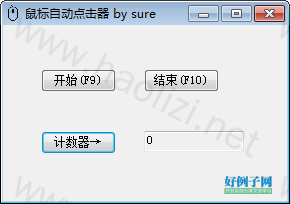
鼠标自动点击器,支持最小化到任务栏,支持快捷键启动与停止
软件说明:F9开始点击,F10结束点击,点“X”可以最小化到托盘,软件最小化到托盘时快捷键依然可用。计数器方便大家观看点击频率。
【实例截图】
【核心代码】
using System;
using System.Collections.Generic;
using System.ComponentModel;
using System.Data;
using System.Drawing;
using System.Linq;
using System.Text;
using System.Windows.Forms;
using System.Threading;
using System.Runtime.InteropServices;

namespace AutoClickMouse
{
    public partial class AutoClickMouseLeftButton : Form
    {
        [DllImport("User32")]
        public extern static void mouse_event(int dwFlags, int dx, int dy, int dwData, IntPtr dwExtraInfo);

        [DllImport("User32")]
        public extern static void SetCursorPos(int x, int y);

        [DllImport("User32")]
        public extern static bool GetCursorPos(out POINT p);

        [StructLayout(LayoutKind.Sequential)]
        public struct POINT
        {
            public int X;
            public int Y;
        }

        //要定义热键的窗口的句柄
        //定义热键ID(不能与其它ID重复)int id,
        //标识热键是否在按Alt、Ctrl、Shift、Windows等键时才会生效KeyModifiers fsModifiers,                 Keys vk                     //定义热键的内容
        [DllImport("user32.dll")]
        public static extern bool RegisterHotKey(IntPtr wnd, int id, MODKEY mode, Keys vk);

        [DllImport("user32.dll")]
        public static extern bool UnregisterHotKey(IntPtr wnd, int id);

        [Flags()]
        public enum MODKEY
        {
            None = 0,
            ALT = 0x0001,
            CTRL = 0x0002,
            SHIFT = 0x0004,
            WIN = 0x0008,
        }

        private NotifyIcon notifyIcon = null;

        public enum MouseEventFlags
        {
            Move = 0x0001,
            LeftDown = 0x0002,
            LeftUp = 0x0004,
            RightDown = 0x0008,
            RightUp = 0x0010,
            MiddleDown = 0x0020,
            MiddleUp = 0x0040,
            Wheel = 0x0800,
            Absolute = 0x8000
        }

        private void AutoClick(int x, int y)
        {
            POINT p = new POINT();
            GetCursorPos(out p);
            try
            {
                SetCursorPos(x, y);
                mouse_event((int)(MouseEventFlags.LeftDown | MouseEventFlags.Absolute), 0, 0, 0, IntPtr.Zero);
                mouse_event((int)(MouseEventFlags.LeftUp | MouseEventFlags.Absolute), 0, 0, 0, IntPtr.Zero);
            }
            finally
            {
                SetCursorPos(p.X, p.Y);
            }
        }
        //构造函数
        public AutoClickMouseLeftButton()
        {
            InitializeComponent();
            System.Windows.Forms.Control.CheckForIllegalCrossThreadCalls = false;
            LB_Numbers.Text = ClickCount.ToString();
            //调用初始化托盘显示函数
            InitialTray();
            RegisterHotKey(this.Handle, 10, MODKEY.None, Keys.F9);
            RegisterHotKey(this.Handle, 11, MODKEY.None, Keys.F10);
        }
        //存放着当前鼠标的位置坐标
        Point CursorPosition = new Point(0, 0);

        //存放着鼠标左键点击次数
        int ClickCount = 0;
        //主线控制程对象
        Thread controlThread;
        //线程主要处理的函数
        private void ThreadRunMethod()
        {
            while (true)
            {
                //this.BT_Start.PerformClick();
                CursorPosition = Cursor.Position;
                AutoClick(CursorPosition.X, CursorPosition.Y);
                Thread.Sleep(1000);
            }
        }

        private void BT_TestClick_Click(object sender, EventArgs e)
        {
            ClickCount  ;
            LB_Numbers.Text = ClickCount.ToString();
        }

        private void BT_Start_Click(object sender, EventArgs e)
        {
            try
            {
                controlThread = new Thread(new ThreadStart(ThreadRunMethod));
                controlThread.Start();
            }
            catch (Exception)
            {
                Application.DoEvents();
            }
            BT_Stop.Enabled = true;
            BT_Start.Enabled = false;
        }

        private void BT_Stop_Click(object sender, EventArgs e)
        {
            try
            {
                if (controlThread != null)
                    controlThread.Abort();
            }
            catch (Exception)
            {
                Application.DoEvents();
            }
            BT_Start.Enabled = true;
            BT_Stop.Enabled = false;
        }

        private void AutoClickMouseLeftButton_FormClosing(object sender, FormClosingEventArgs e)
        {
            e.Cancel = true;
            //通过这里可以看出,这里的关闭其实不是真正意义上的“关闭”,而是将窗体隐藏,实现一个“伪关闭”
            this.Hide();
        }

        private void InitialTray()
        {
            //隐藏主窗体
            this.Hide();

            //实例化一个NotifyIcon对象
            notifyIcon = new NotifyIcon();
            //托盘图标气泡显示的内容
            notifyIcon.BalloonTipText = "正在后台运行";
            //托盘图标显示的内容
            notifyIcon.Text = "鼠标自动点击器";
            //注意:下面的路径可以是绝对路径、相对路径。但是需要注意的是:文件必须是一个.ico格式
            //notifyIcon.Icon = new System.Drawing.Icon("F:/renjiashuo/program/AutoClickMouse/AutoClickMouse/mouse.ico");
            ComponentResourceManager resources = new ComponentResourceManager(typeof(AutoClickMouseLeftButton));
            notifyIcon.Icon = ((System.Drawing.Icon)(resources.GetObject("$this.Icon")));
            //true表示在托盘区可见,false表示在托盘区不可见
            notifyIcon.Visible = true;
            //气泡显示的时间(单位是毫秒)
            notifyIcon.ShowBalloonTip(5000);
            notifyIcon.MouseClick  = new System.Windows.Forms.MouseEventHandler(notifyIcon_MouseClick);

            ////设置二级菜单
            //MenuItem setting1 = new MenuItem("二级菜单1");
            //MenuItem setting2 = new MenuItem("二级菜单2");
            //MenuItem setting = new MenuItem("一级菜单", new MenuItem[]{setting1,setting2});

            //帮助选项,这里只是“有名无实”在菜单上只是显示,单击没有效果,可以参照下面的“退出菜单”实现单击事件
            //MenuItem help = new MenuItem("帮助");

            //关于选项
            MenuItem about = new MenuItem("关于");
            about.Click  = new EventHandler(new_about);

            //退出菜单项
            MenuItem exit = new MenuItem("退出");
            exit.Click  = new EventHandler(exit_Click);

            ////关联托盘控件
            //注释的这一行与下一行的区别就是参数不同,setting这个参数是为了实现二级菜单
            //MenuItem[] childen = new MenuItem[] { setting, help, about, exit };
            //MenuItem[] childen = new MenuItem[] { help, about, exit };
            MenuItem[] childen = new MenuItem[] { about, exit };
            notifyIcon.ContextMenu = new ContextMenu(childen);

            //窗体关闭时触发
            this.FormClosing  = new System.Windows.Forms.FormClosingEventHandler(this.AutoClickMouseLeftButton_FormClosing);
        }

        private void new_about(object sender, EventArgs e)
        {
            AboutBox aboutbox = new AboutBox();
            aboutbox.ShowDialog();
        }

        /// <summary>
        /// 鼠标单击
        /// </summary>
        /// <param name="sender"></param>
        /// <param name="e"></param>
        private void notifyIcon_MouseClick(object sender, System.Windows.Forms.MouseEventArgs e)
        {
            //鼠标左键单击
            if (e.Button == MouseButtons.Left)
            {
                //如果窗体是可见的,那么鼠标左击托盘区图标后,窗体为不可见
                if (this.Visible == true)
                {
                    this.Visible = false;
                }
                else
                {
                    this.Visible = true;
                    this.Activate();
                }
            }
        }

        /// <summary>
        /// 退出选项
        /// </summary>
        /// <param name="sender"></param>
        /// <param name="e"></param>
        private void exit_Click(object sender, EventArgs e)
        {
            //退出程序
            System.Environment.Exit(0);
        }

        //快捷键
        protected override void WndProc(ref Message m)
        {
            if (m.Msg == 0x0312)
            {
                switch (m.WParam.ToInt32())
                {
                    case 10:
                        this.BT_Start_Click(null,null);
                        break;
                    case 11:
                        this.BT_Stop_Click(null, null);
                        break;
                    default:
                        break;
                }
                return;
            }
            base.WndProc(ref m);
        }
    }
}
好例子网口号:伸出你的我的手 — 分享!
相关软件
小贴士
感谢您为本站写下的评论,您的评论对其它用户来说具有重要的参考价值,所以请认真填写。
- 类似“顶”、“沙发”之类没有营养的文字,对勤劳贡献的楼主来说是令人沮丧的反馈信息。
- 相信您也不想看到一排文字/表情墙,所以请不要反馈意义不大的重复字符,也请尽量不要纯表情的回复。
- 提问之前请再仔细看一遍楼主的说明,或许是您遗漏了。
- 请勿到处挖坑绊人、招贴广告。既占空间让人厌烦,又没人会搭理,于人于己都无利。
关于好例子网
本站旨在为广大IT学习爱好者提供一个非营利性互相学习交流分享平台。本站所有资源都可以被免费获取学习研究。本站资源来自网友分享,对搜索内容的合法性不具有预见性、识别性、控制性,仅供学习研究,请务必在下载后24小时内给予删除,不得用于其他任何用途,否则后果自负。基于互联网的特殊性,平台无法对用户传输的作品、信息、内容的权属或合法性、安全性、合规性、真实性、科学性、完整权、有效性等进行实质审查;无论平台是否已进行审查,用户均应自行承担因其传输的作品、信息、内容而可能或已经产生的侵权或权属纠纷等法律责任。本站所有资源不代表本站的观点或立场,基于网友分享,根据中国法律《信息网络传播权保护条例》第二十二与二十三条之规定,若资源存在侵权或相关问题请联系本站客服人员,点此联系我们。关于更多版权及免责申明参见 版权及免责申明

网友评论
我要评论